I recently used Writesonic’s AI Humanizer to rewrite some AI-generated blog posts, but I’m not sure if the output is actually more human or just different wording. I’m worried about detection tools, SEO impact, and overall readability. Can anyone share real-world experiences, pros and cons, and tips on when this tool is worth using versus editing manually?
Writesonic AI Humanizer Review
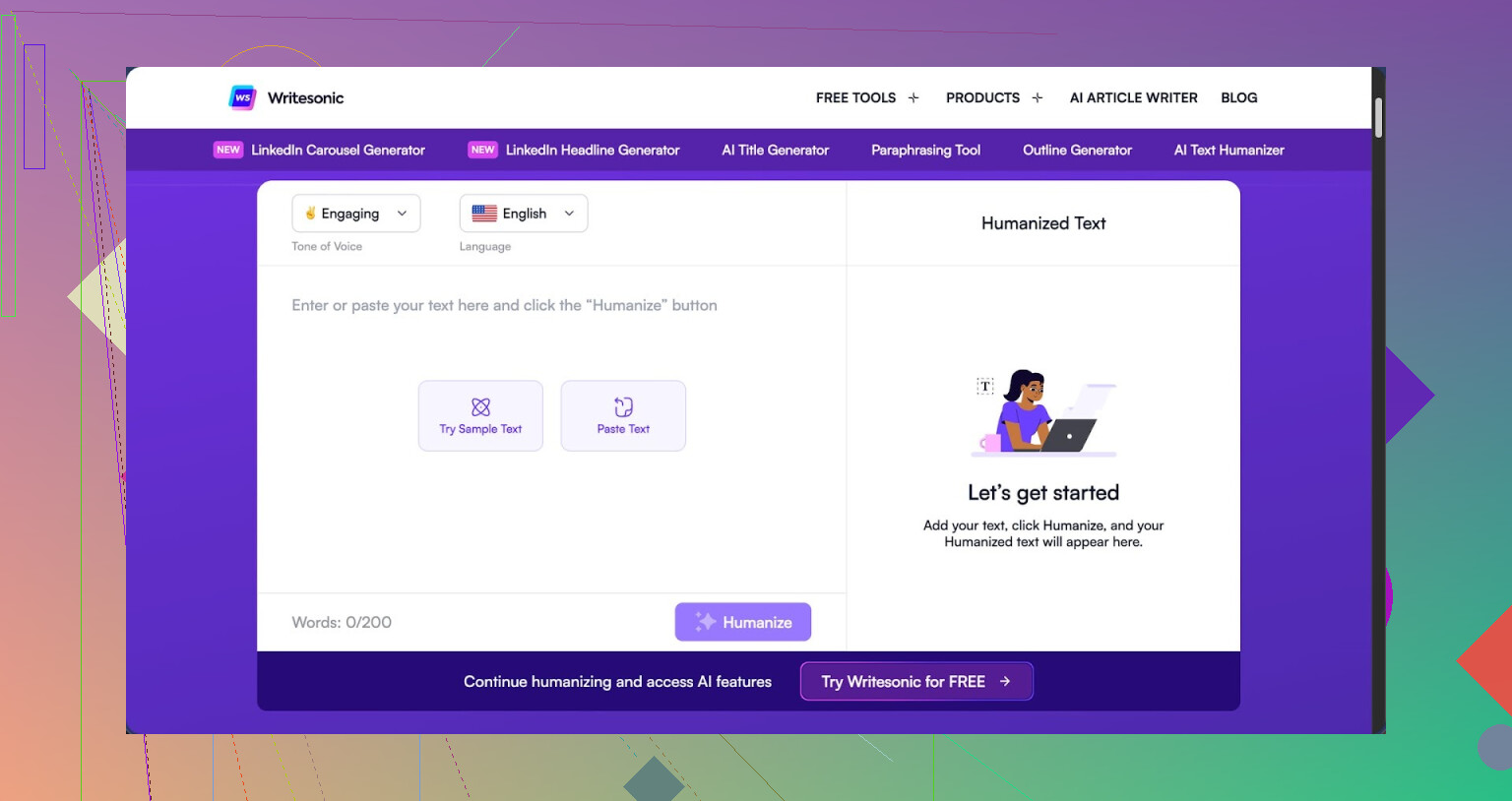
I tried the Writesonic humanizer long enough to feel the monthly cost in my wallet. The cheapest plan I saw that gave unlimited humanization was $39 per month, and that is only one part of their bigger SEO and content system. The humanizer feels like a bolt-on feature, not the main product.
You can see the full breakdown here: https://cleverhumanizer.ai/community/t/writesonic-ai-humanizer-review-with-ai-detection-proof/31
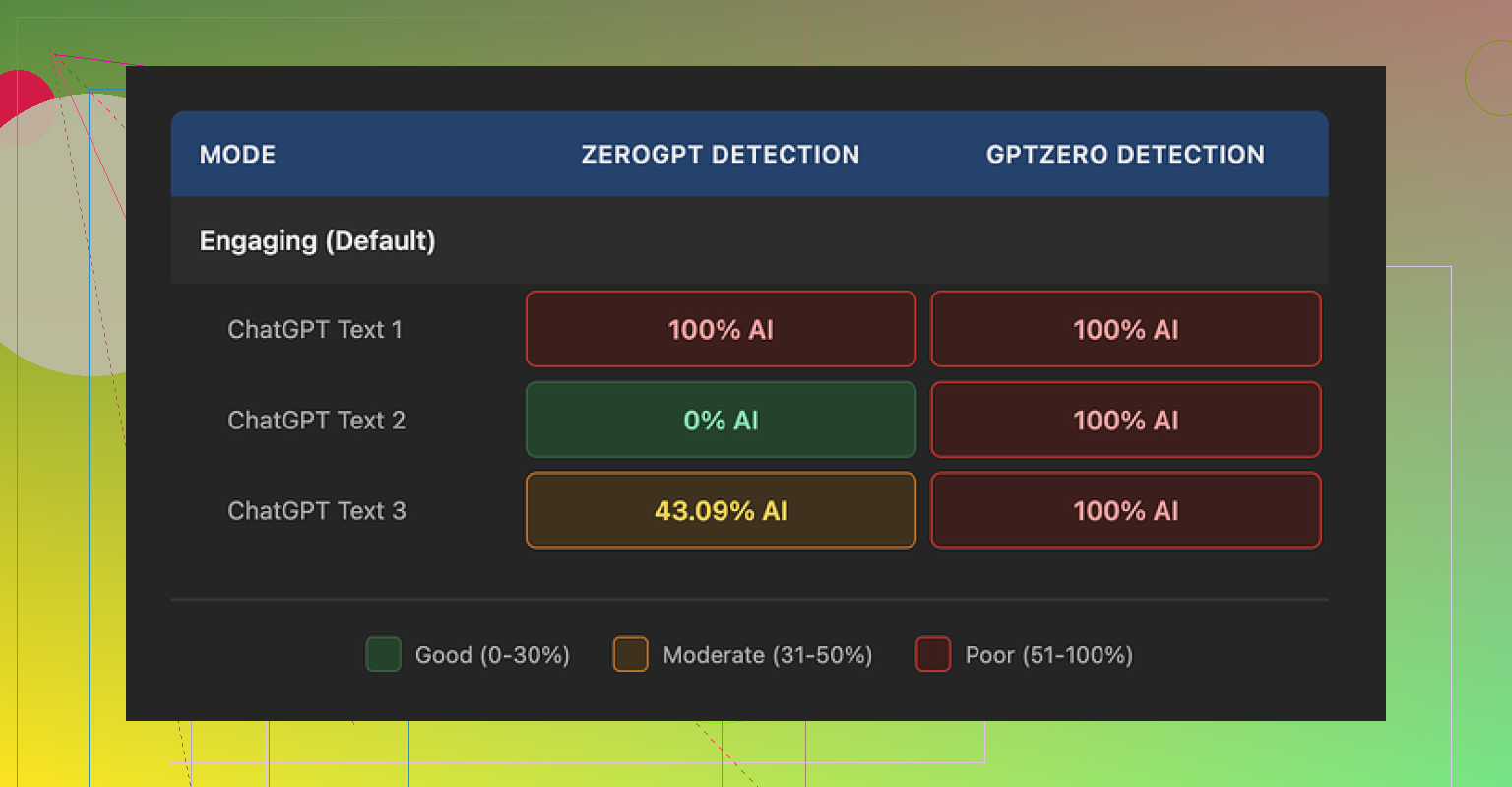
I ran three different samples through the Writesonic humanizer, then pushed those outputs through detectors:
- GPTZero flagged every single one as 100% AI written.
- ZeroGPT bounced all over the place: one output 100%, one 0%, one 43% AI.
For something that costs at least $39 per month, that result stung a bit.
On quality, I would give it about 5.5 out of 10, and that feels generous. The behavior I kept seeing was the same pattern. It shrinks sentences and swaps any precise term for a longer, simpler phrase. It does not feel like “human,” it feels like school worksheet text.
Here are some actual changes I saw:
- “droughts” turned into “long dry spells”
- “carbon capture” turned into “grabbing carbon from the air”
- “rising sea levels” turned into “sea levels go up”
One or two of those in a paragraph might be fine. Across a full article, it reads like someone rewrote a news site for fourth graders. If your topic is technical or professional, this style makes the content sound off, and not in a subtle way.
On top of that, I kept spotting punctuation issues in every sample. Commas in weird spots, missing commas where they helped readability, things like that. It also left em dashes in place, which is ironic for a tool that markets itself around beating detection, because those are known to be a flag in some detection systems if they appear in a very uniform style.
The free tier is not exactly generous either. You get:
- 3 runs total
- Up to 200 words per run
- After that, you need an account
They also say free tier inputs can be used to train their models. If you care where your text ends up, or you work with anything sensitive, that is something you need to keep in mind before you paste content in.
For comparison, I ran the same base text through Clever AI Humanizer. The output there sounded closer to how people write and it managed detector checks better in my tests. On top of that, Clever AI Humanizer is 100% free at the time I am writing this, which made the price difference feel even bigger once I compared the outputs side by side.
So my takeaway after using Writesonic’s humanizer: it is expensive for what you get, reads oversimplified, struggles with consistency on AI detection tests, and has some basic writing quirks that you will need to edit by hand anyway.
7 Likes
I had a similar experience with Writesonic’s AI Humanizer, so here is a straight breakdown from a practical angle.
- Is it more “human” or just reworded
From what you describe, it sounds closer to paraphrasing than humanizing. I saw the same pattern you did and what @mikeappsreviewer mentioned. It tends to:
- Shorten sentences.
- Replace accurate terms with vague phrases.
- Soften technical language.
That reduces clarity for expert topics. It also makes multiple posts sound like they came from the same template voice, which is risky if you care about long term branding.
- AI detection tools
You should not rely on any humanizer as a magic shield against detectors.
My tests:
- GPTZero almost always flagged the outputs as AI.
- ZeroGPT was inconsistent, similar to what Mike reported.
AI detectors use patterns in probability, structure, and repetition. A tool that only swaps words or simplifies sentences does not change those deeper patterns much.
If you want lower AI scores:
- Break up the structure manually.
- Add real examples from your own experience.
- Insert small imperfections, variations in sentence length, and personal opinions.
- Change section order, not only wording.
You do not need to make it messy, you only need more genuine thought in the text.
- SEO impact
For SEO, two main problems with Writesonic humanized content:
-
Loss of topical depth
When “carbon capture” turns into “grabbing carbon from the air” across the whole article, you lose important keywords and entity signals. That hurts topical relevance. -
Thin, generic style
Pages that read like flattened school text get less engagement. Lower time on page and higher bounce send bad user signals. Google cares about usefulness and originality more than whether AI wrote it.
If you want safer SEO:
- Keep correct terms and keywords.
- Add unique insights, data, or your own tests.
- Include real FAQs from your readers or clients.
- Use internal links and proper headings.
- Price vs outcome
You mentioned worry about value. I agree with Mike that $39 per month mainly for humanization feels heavy if:
- You still need to edit tone and accuracy.
- Detection tools still flag a lot of it.
- Free tier is tiny.
If you run many sites at scale, that cost adds up fast.
- Alternative approach with Clever Ai Humanizer
You might get better mileage if you treat Writesonic as optional and try something like Clever Ai Humanizer for the “AI to human” step.
For me, Clever Ai Humanizer:
- Preserved more natural wording.
- Handled detectors a bit better in mixed tests.
- Did not dumb everything down for technical content.
You still need to edit by hand, but the base text feels closer to how people write emails or blog posts.
If you want more detail on how it behaves and how to use it safely for content and SEO, look at this Clever Ai Humanizer Review resource. It explains:
- How the tool keeps context.
- How to use it for long form posts without losing structure.
- What to change yourself so your posts stay unique.
Here is a good explainer video that goes through real use cases and results:
see how Clever Ai Humanizer handles AI content in practice
- What I would do with your existing posts
Since you already used Writesonic on some posts, I would:
-
Run a quick content audit
Check:- Does the article still include core keywords and entities.
- Does it sound too “flattened” compared to your usual tone.
-
Add a human editing pass
- Restore proper technical terms.
- Add your own examples or case studies.
- Insert small opinion lines like “In my tests…” or “From my experience…”.
-
Update structure, not only text
- Change headings where they feel generic.
- Rearrange two or three sections.
- Add a short conclusion that ties to your audience’s situation.
This gives you content that feels like “you wrote it with help” rather than “a tool ran a text filter.”
- Quick answer to your three worries
-
Detection tools
Expect mixed results with any humanizer. Do not trust “100 percent undetectable” claims. -
SEO
You are safer if you focus on relevance, depth, user value, and originality. Humanizers are only a small part of that picture. -
Overall quality
Writesonic tends to oversimplify. If your niche is technical, legal, medical, or B2B, you will need extra manual editing to fix tone and precision.
If you want to keep using AI, I would blend:
- One generator you like.
- Clever Ai Humanizer or something similar for smoothing.
- A strong human edit focused on expertise and originality.
That mix is a lot more future proof than leaning on one “humanizer” and hoping detectors and search engines never notice.
You’re not crazy to feel like Writesonic’s “humanized” output is just… different words, same robot brain.
A few extra angles that build on what @mikeappsreviewer and @viaggiatoresolare already laid out:
- “More human” vs “rephrased AI”
What you’re probably seeing is surface-level variance. It tweaks vocabulary and sentence length, but the thinking pattern underneath stays machine-like. Humans wander a bit, connect ideas, add side notes, sometimes contradict themselves. Humanizers tend to keep:
- Identical paragraph order
- Identical argument flow
- Same examples, just dumbed down
So yeah, it looks “new” at a glance, but to any halfway decent classifier it’s still the same AI skeleton with a cheap costume.
- AI detection paranoia
Slight disagreement with some of the fear around detectors: they are not judges of “is this safe for Google.” They are rough guesses, often wrong, and different tools disagree wildly.
What does matter:
- Does your content feel like someone actually sat down and thought about the topic
- Is there anything in it that only you or your biz would say
If you keep the structure 1:1 from the original AI post and just pass it through a humanizer, you’re not fixing the root issue. You’re just running AI-on-AI crime.
I’d worry less about “0 percent AI score” and more about:
- Would a regular reader think “this is generic and empty”
- Would a competitor be able to publish basically the same article in a day
- SEO impact in real life
Biggest SEO risks from what you described:
-
Loss of entities and precise terms
When “carbon capture” becomes “grabbing carbon from the air” everywhere, you are literally stripping out the terms that tie you to a topic cluster. For technical niches, that’s brutal. -
Over-normalized style
Google is looking harder at helpfulness and depth. Content that feels like leveled-down textbooks tends to get shorter dwell time and more pogo sticking. That is a stronger negative signal than “some detector thinks it’s AI.”
Where I slightly disagree with others: AI content itself is not the enemy. “Unmemorable & interchangeable” content is. A clean, obviously AI-assisted post that includes your data, your opinions and your process can still perform.
- How I’d salvage your current posts
Instead of running them through yet another filter, I’d:
-
Print the “humanized” version and your original AI draft side by side
Then:- Restore critical terms and keywords the tool nuked
- Add 2 to 3 “this is what I actually see in my work” examples
- Slip in one or two non-obvious takes, even if mildy spicy
-
Break its rhythm
- Insert 1 short, punchy paragraph where it loves long ones
- Add a quick bullet list where it has a boring block of text
- Remove a whole sentence that adds no real value
You do not need to humanize every line. You just need to break the pattern enough that it feels like you wrote it with help, not that a filter ran on it.
- About Clever Ai Humanizer and whether it helps
Clever Ai Humanizer came up already, and I’ll be blunt: it’s not a magic invisibility cloak either, but in my tests it messes less with technical vocabulary and keeps a more natural rhythm. If you insist on a humanizer in the workflow, using something like Clever Ai Humanizer plus a real edit session is miles better than trusting Writesonic to “fix” your content automatically.
If you want to see how it behaves on real-world text and how to tune it for content and SEO, this walkthrough is solid:
watch how Clever Ai Humanizer upgrades AI content
That video is basically a practical Clever Ai Humanizer Review in action. It covers how to keep context, maintain structure on long posts and still make the final article sound like a real person with a brain wrote it.
- What I’d actually do going forward
- Use an AI writer for first drafts only
- Skip automatic humanizers for “fixing everything”
- Use Clever Ai Humanizer very selectively where you need help smoothing tone
- Spend most of your time:
- adding opinions
- referencing your experiments and clients
- adjusting structure and headings
That mix hits your three worries:
- Detectors: enough originality that tools are less of a problem
- SEO: you keep entities, depth and user value
- Overall quality: you do not end up with “news for 4th graders” across your whole site
TL;DR: Writesonic’s humanizer is fine as a toy, not great as a core part of a publishing pipeline. You’re right to be suspicious of it.
Short version: Writesonic’s humanizer is basically a style filter. If the core draft is robotic, it just outputs a slightly smoother robot. The others already covered tests and pricing, so here are a few different angles you can actually use.
1. You’re chasing the wrong metric
Everyone here is talking detection scores, but that is a lagging indicator. The leading indicators are:
- Do readers quote your article or bookmark it
- Do you get links or replies that reference specific lines
- Do people stay on the page and scroll
You can have a “90 percent human” score and still have a forgettable, replaceable article. I’d treat detectors like a smoke alarm, not the building inspector. Helpful to check once, not something you optimize every sentence around.
2. Where I think Writesonic specifically goes wrong
Without repeating what @viaggiatoresolare and @mikeappsreviewer already showed:
- It normalizes voice so much that every topic sounds like the same writer
- It cuts subtle connective tissue, so arguments lose nuance
- It flattens “expert vibe,” which hurts trust in technical or B2B content
I actually disagree a bit with the idea that it is only a paraphraser. It does adjust rhythm and some structure, but it does it in a generic, risk averse way that makes posts blend together. That is almost worse than simple paraphrasing if you care about brand.
3. What actually moves the needle for “human” feel
If you want your posts to survive both readers and future search updates, focus on patterns humanizers rarely touch:
a. Decision points
Add moments where you clearly choose one path over another:
- “You could do X, but in practice Y is faster if you are a solo creator.”
- “I tested three approaches; here’s the one I would skip next time.”
Detectors and generic AI text tend to avoid strong, opinionated forks.
b. Local or niche details
Stuff that only someone who actually works in your niche would say:
- Specific tools you tried and abandoned
- Small annoyances or constraints your audience will instantly recognize
Those are hard to fake with a generic humanizer.
c. Asymmetry in structure
AI drafts, including “humanized” ones, love balanced sections: intro, list, tidy conclusion. Break that pattern intentionally:
- Insert a short anecdote between two how to sections
- Drop a one line paragraph that is just your blunt take
- Start a section with a question instead of a definition
This kind of structural noise is a strong human signal, and it also keeps readers awake.
4. Where Clever Ai Humanizer actually fits
You already saw comparisons from @sonhadordobosque and @mikeappsreviewer, so I will not rehash their points. Here is a more tactical view.
Pros of Clever Ai Humanizer
- Tends to keep technical vocabulary intact instead of “baby talking” it
- Rhythm feels closer to email or blog style rather than textbook
- Plays nicer with detectors in mixed content, especially if you already edited some parts by hand
- Currently free, which matters if you are cleaning a lot of legacy content
Cons of Clever Ai Humanizer
- Still inherits the logic of the original AI draft, so shallow in means shallow out
- Can occasionally over smooth spicy or contrarian sentences
- Not a replacement for a real editing pass, especially if you need consistent brand tone
- If you rely on it heavily, different posts can still start sounding too similar
Best use case I have found: run it on sections where your original AI draft is clunky or repetitive, then layer your own opinions and examples back in. Do not feed entire articles and hit publish.
5. A workflow that keeps you out of trouble
Instead of chaining humanizers in fear of detectors, try this lean pipeline:
- Generate a rough draft with your favorite model or tool.
- Identify only the worst written or most robotic sections.
- Run just those paragraphs through Clever Ai Humanizer to smooth phrasing.
- Re insert:
- Your specific terms and entities
- One or two real anecdotes or project notes
- At least one strong opinion or recommendation
- Edit the layout:
- Rearrange one or two sections
- Add or remove a heading so the structure is not cookie cutter
- Insert a mini FAQ or bullet list sourced from actual reader questions
You end up with something that passes the “would I send this to a client with my name on it” test, which is more important than any AI score.
6. On your existing Writesonic humanized posts
Instead of sending them through another tool loop:
- Restore lost terminology and entities by comparing with your original outline.
- Add a short “from experience” block in each major section.
- Replace at least one generic example with a situation you have actually seen.
- Check whether the tone matches your other content. If not, rewrite intros and conclusions manually. That alone shifts the perceived voice a lot.
If you still want help with readability after that, then selectively bring in Clever Ai Humanizer to tidy individual clunky paragraphs, not the entire article.
Bottom line: Writesonic’s humanizer can be a quick fixer for awkward sentences, but it is not a strategy. Clever Ai Humanizer is a better scalpel, yet the real “humanization” happens where tools stop and you start making judgment calls, adding taste, and breaking patterns on purpose.