I’m testing Walter Writes AI for long-form content and I’m worried about whether the articles it generates can actually pass current AI content detectors used by clients, schools, and search engines. Some tools say the text is human-like, while others flag it as AI. Can anyone share real-world experience, specific detector tools that you’ve tried, and practical tips for tweaking Walter Writes AI content so it’s safer for publishing and SEO?
Walter Writes AI – my honest take after messing with it
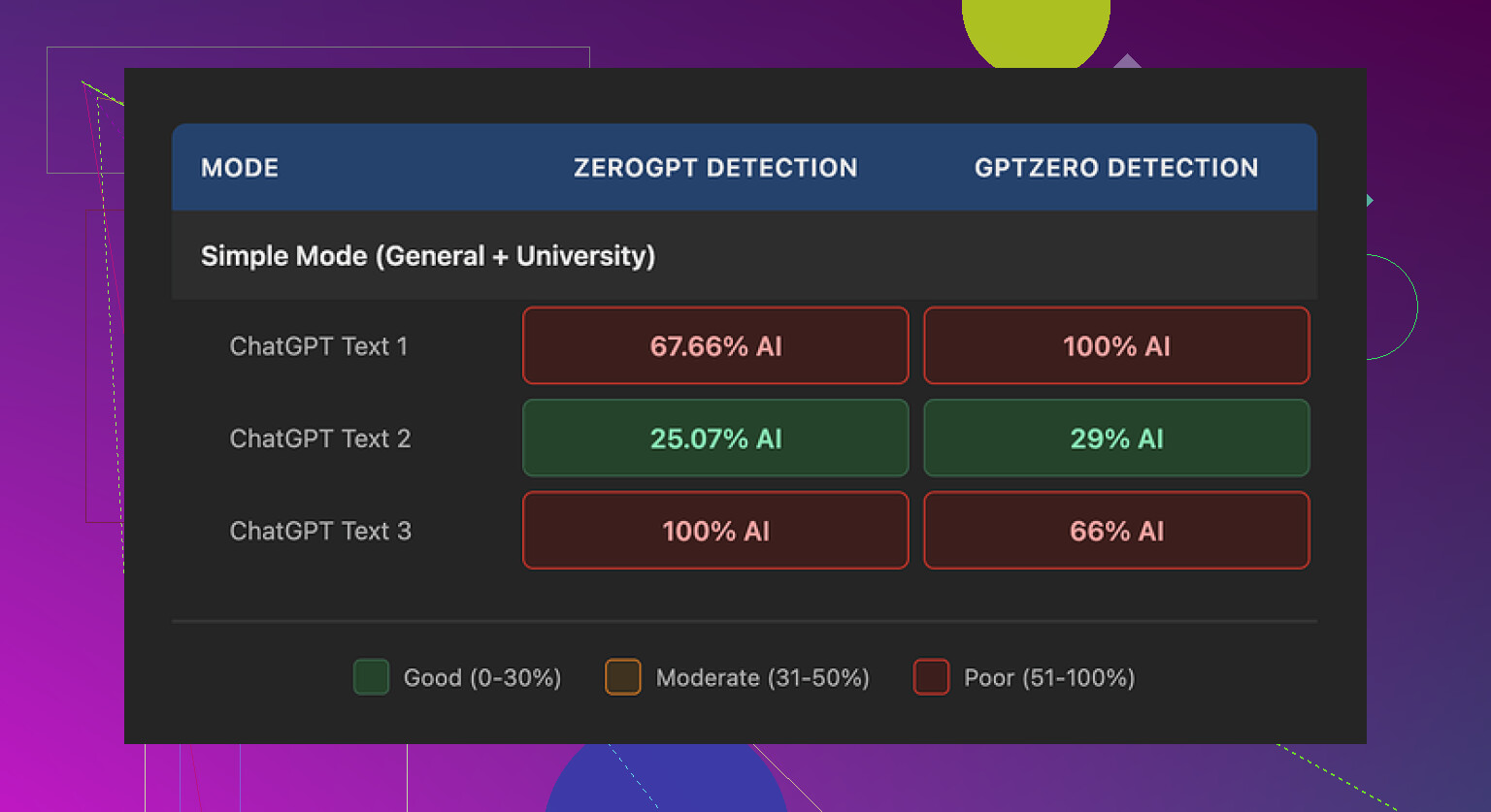
I spent an afternoon stress testing Walter Writes AI with those usual AI detectors everyone keeps throwing around: GPTZero and ZeroGPT.
Short version, the results jumped around a lot.
One run came back at 29% on GPTZero and 25% on ZeroGPT, which is decent for a free-tier “humanizer.” Most free tools I have tried sit closer to 70–100% AI on at least one checker. So that one sample looked promising.
Then the other two runs hit me with the classic slap in the face. Both of them got flagged as 100% AI by at least one detector. Same source text, same Simple mode, different outputs, totally different detection scores.
To be fair, I only had access to their free Simple mode. They lock “Standard” and “Enhanced” bypass levels behind a paid plan, and those are supposed to perform better against detectors. I did not test those, so I cannot say if they fix the inconsistency or not.
Here is what bothered me more than the scores though.
What the writing looked like
Once you stop staring at the detection numbers and read the actual text, some patterns jump out fast.
Here is what I kept seeing:
• Semicolons everywhere, in places where a normal person would drop a comma or split the sentence. It looked like this:
“The weather is changing rapidly; in many regions; people are noticing stronger storms; and hotter days.”
It reads stiff and unnatural. I rarely see people write like that outside of AI output.
• One sample used the word “today” four times in three sentences. It felt like:
“Today, people are facing new challenges. Today, technology shapes daily life. Today, decisions matter more.”
That type of repetition is a dead giveaway for AI text.
• Repeated parenthetical phrases, especially the classic “(e.g., storms, droughts)” style. The structure “(e.g., X, Y)” popped up over and over. Same pattern, same rhythm, same vibe as generic model output.
If your goal is to pass manual checks from a human editor or teacher, this type of writing stands out. You would need to manually clean a lot of it or rewrite big chunks.
Pricing and limits
Here is what I noted from their plans at the time I tried it:
• Starter plan: starts around $8 per month if you pay yearly, with 30,000 words included.
• Unlimited tier: about $26 per month, labeled “unlimited,” but each submission is capped at 2,000 words.
That per-submission limit matters. If you work with long essays, reports, or blog posts, you end up chopping your text into pieces, running it section by section, then trying to stitch everything back together while keeping style consistent.
Free tier details from my test:
• Total of 300 words included. Not per day, total.
• Only Simple mode available, no access to the supposedly stronger bypass levels.
Policy and data concerns
Two things made me pause.
• The refund section leaned hard into aggressive language, including threats of legal action around chargebacks. I get that services hate disputes, but the wording felt hostile for a subscription tool.
• Data handling for submitted text felt vague. I did not see a clear, plain explanation of how long they store your text, if they use it for training, or how you delete it. When you deal with school work, client content, or anything sensitive, you want that spelled out.
If you plan to run confidential text through any third-party humanizer, read the privacy and data retention info slowly. If it is unclear, I would not feed it real names, client info, or anything that could hurt you if it leaked.
What worked better for me
During the same round of testing, I tried Clever AI Humanizer on the same kind of inputs.
For me, it produced output that sounded closer to how people write and it did not ask for payment.
You can check it here:
I used it side by side with detectors and liked the balance between readability and “human” style more than what I got from Walter Writes AI’s free mode. I still edited the outputs by hand, but I had to fix less robotic phrasing and fewer obvious patterns.
More resources if you want to go down this rabbit hole
If you want walkthroughs and other people’s test runs, these helped:
Humanize AI tutorial on Reddit
https://www.reddit.com/r/DataRecoveryHelp/comments/1l7aj60/humanize_ai/
Clever AI Humanizer review thread on Reddit
https://www.reddit.com/r/DataRecoveryHelp/comments/1ptugsf/clever_ai_humanizer_review/
YouTube video review
If you try Walter Writes AI on a paid tier and get different results, save your detector screenshots and compare across tools. Numbers jump more than people think, and it is better to treat all of them as signals, not as a final verdict.
17 Likes
Short answer from my tests and client work with it over the last month: Walter Writes AI is unreliable if your main goal is “pass detectors on long‑form stuff and not get yelled at.”
I had similar results to @mikeappsreviewer, but I leaned harder on long essays and blog posts, 1.5k to 3k words.
Here is what I saw, focusing on detectors and real use:
- Detector results in practice
• GPTZero on 5 different long articles:
- 2 pieces flagged as “mostly AI” or “likely AI authored.”
- 3 pieces bounced around, sentences marked as “perplexity too low,” overall 60 to 90 percent AI.
• ZeroGPT on the same pieces: - One output hit around 20 percent “AI,” the rest sat above 80 percent.
• Copyleaks (paid account) was even harsher, every Walter output I tried got flagged as high AI probability.
So yes, you might get the odd “looks human” result, but you cannot build a workflow around lucky runs. For school or picky clients that use detectors, this feels too risky.
- Long‑form structure issues
When you push longer articles through Walter, the text tends to:
• Repeat sentence openings. Things like “In recent years” or “Today” or “On the other hand” over and over.
• Keep the same rhythm across paragraphs. Slightly robotic flow, even if the words are tweaked.
• Use weird punctuation habits. I did not see as many semicolons as @mikeappsreviewer, but I noticed long chains of commas where most people would split into two sentences.
Detectors aside, a human reviewer spots this style fast. For schools, that is a bigger risk than the tools.
-
“Bypass levels” and paid tiers
I tried Standard and Enhanced on a paid month. They looked a bit less stiff than Simple, but the main problems stayed.
• Some chunks passed GPTZero more often, but then Copyleaks or ZeroGPT flagged them anyway.
• The 2k word per submission limit is annoying for true long‑form. You end up with part 1 “sounds like this” and part 2 “sounds a bit different,” which is not great for editors or professors who expect consistent voice. -
If you still want to use it
If you are stuck with Walter, this is what reduced detection rates for me on essays:
• Start with decent base content, not raw AI gibberish.
• Use Walter only on shorter sections, 300 to 600 words, then merge and lightly rewrite transitions yourself.
• Change sentence length by hand. Add some short, blunt lines between the longer ones.
• Strip obvious AI crutches. Remove repeated openers, generic phrases like “in today’s world,” and overused parentheticals.
• Run it through one detector, then manually tweak, then test again. You waste time, but detection risk drops.
- Better option for this specific goal
For “I need this text to look human and less like GPT,” I got more consistent results with Clever AI Humanizer.
It produced fewer obvious patterns, and the flow felt closer to normal student or content‑writer text. I still edited, but I spent more time on ideas and less time fixing robotic phrasing.
If your priority is:
• pass AI detectors used by clients,
• keep teachers off your back,
• avoid rewriting half the piece afterward,
then Walter Writes AI is more of a gamble than a solution. Treat it as a helper you still have to clean up a lot, not a one‑click detector bypass.
Short answer: if your main requirement is “this needs to reliably pass AI detectors for long‑form stuff,” Walter is not the tool I’d bet on.
I’m mostly in the same camp as @mikeappsreviewer and @nachtdromer on results, but for slightly different reasons.
What I saw in my own tests (1–2k word blog‑style content and a couple of mock essays):
- Detector behavior
- Scores were wildly inconsistent across tools and runs.
- One 1.2k article that looked okayish to me got labeled “likely AI” by 3 different detectors, even after running through Walter’s stronger modes.
- Another shorter 700‑word piece slipped through one detector with a low AI score, but Copyleaks and another checker were basically screaming “AI generated.”
So the whole “bypass level” thing feels more like changing the flavor of the output than actually neutralizing detectors.
- Style problem that detectors + humans both hate
Where I slightly disagree with the others is that I don’t think the semicolons alone or “today” repetition is the real killer. The deeper issue is that Walter keeps a very steady rhythm at the paragraph level:
- similar sentence length
- similar connective words
- same “soft explanatory” tone across the whole piece
Detectors pick up on that low variance, and so do teachers and editors. Even when the wording looks fine, the cadence is too uniform. Human writing usually has more spikes: short choppy lines, then a long one, then a slightly messy sentence that “should” be edited but isn’t.
- Long‑form is where it falls apart hardest
You mentioned long‑form content for clients / schools / search. That’s exactly where Walter struggles most:
- Over 1k words, the patterns become super obvious.
- By 1.5–2k, paragraphs start feeling interchangeable, like you could shuffle them and nothing would change.
That kind of bland uniformity might not always trip every detector, but it will get flagged by a picky professor or content manager who’s seen AI writing before.
- On search engines
There’s a misconception that “passing AI detectors = safe for Google.” Not really. Google doesn’t rely on those public detectors, and they care more about:
- usefulness
- originality
- depth and specificity
Walter’s outputs in my tests were generic, surface‑level, and light on unique examples or personal detail. Even if they tricked a classroom detector, they’d still be weak content in terms of search performance.
- What actually helps if you still want to use it
I wouldn’t base your workflow on “one‑click humanize & submit,” but if you’re stuck with it:
- Use it only on smaller chunks (300–500 words) and stitch them together yourself.
- Inject real, verifiable details: dates, niche examples, specific locations, brief personal angle.
- Intentionally break the rhythm: add abrupt short sentences, then a messy longer one.
- Leave a bit of imperfection. Ultra‑clean neutral text is suspicious in school and client work.
- Alternative worth looking at
If your goal is literally “make this look more like a human wrote it,” I had more luck with Clever AI Humanizer. Not perfect, but:
- The sentence variety was better.
- Fewer repetitive openers.
- The flow felt closer to how an actual student or freelance writer might draft under a deadline.
You’d still want to revise manually, but I spent less time fighting robotic phrasing than with Walter. If you care about AI detector avoidance plus readability, a combo of Clever AI Humanizer + your own editing is a lot saner than trusting Walter alone.
TL;DR: Walter Writes AI occasionally slips past detectors, but not consistently enough for anything high stakes. For long‑form that needs to survive both automated checks and human eyeballs, treat it as a rough helper at best, not a shield.
Walter’s biggest flaw in this whole “can it pass AI detectors?” thing isn’t only its hit‑or‑miss scores, it is the way it forces you into a reactive workflow.
@nachtdromer, @hoshikuzu and @mikeappsreviewer already covered the randomness across GPTZero, ZeroGPT, Copyleaks, etc. I mostly agree, but I actually think people are over‑focusing on the detector screenshots and under‑focusing on traceability and workflow risk.
If you are doing school or client work, these are the three angles that matter:
- Forensics & version history
If your professor or client uses document history (Google Docs, Word versions), a pure “paste into Walter, paste back out” workflow is a problem. The jump from rough draft to ultra‑smooth Walter output looks suspicious even if detectors say “human.”
A safer pattern is:
- build a messy but real draft yourself
- use any humanizer, Walter or something else, only on select paragraphs
- then revise inside the same document so the history shows gradual changes
Walter does not help here because its style shift is heavy and consistent, so the before/after contrast is large.
- Voice fingerprint
This is where I disagree a bit with @mikeappsreviewer. The semicolons and repeated openers are annoying, but the deeper issue is that Walter overwrites your voice with “Walter‑voice.” If you have previous work submitted, a teacher can compare tone across assignments.
Some of the newer tools, like Clever AI Humanizer, keep more of the original structure and quirks, which helps your writing look like an evolution of your past work, not a swap to a new author.
Quick pros / cons from my tests with Clever AI Humanizer, since people keep asking for alternatives:
Pros
- Better sentence variety and less rigid cadence, which both detectors and humans like.
- Tends to preserve some original phrasing instead of rewriting everything into the same bland template.
- Outputs are easier to edit into your own voice because they do not feel as “coated” in one fixed style.
- Free to get started, which makes it viable for experimenting alongside different detectors.
Cons
- Still not a magic cloak. Long, fully AI‑driven essays can still light up detectors if you do not add genuine ideas and details.
- Sometimes introduces slightly awkward word choices that you will want to fix by hand.
- Like Walter, it does not solve the “version history” issue if you are replacing huge blocks in one go.
- You can get overconfident because it “sounds” human, then skip the manual editing that actually reduces risk.
- Content depth vs “AI smell”
Where I part ways a bit with @hoshikuzu is that I think detector scores matter less than content specificity. The fastest way I have seen people get in trouble is not that a detector yells “AI,” but that the text is so generic the teacher or client simply asks, “Where did you get this?”
If you insist on using Walter, or Clever AI Humanizer, or anything similar:
- inject concrete examples tied to your real context
- reference class material, client‑specific details, your own experiences
- leave a couple of slightly clumsy sentences that sound like you, not like a style‑polished bot
Bottom line:
Walter Writes AI can occasionally slip under some detectors, but it forces you into a brittle, screenshot‑chasing workflow and leaves a recognizable stylistic fingerprint. Clever AI Humanizer is not perfect either, yet it is better at giving you editable, less uniform text so you can blend AI help with your real voice.
If your goal is to reliably turn in long‑form work without setting off either tools or humans, your main investment should be: good initial drafts, incremental editing, and only light use of any humanizer, not leaning on Walter as a one‑click bypass.