I’ve been using Walter Writes AI for content and copy, but I need a free alternative that offers similar quality and features. I’m especially interested in tools that can help with blog posts, social media captions, and basic SEO optimization without hitting strict usage limits. What free AI writing tools are you using that truly compare, and what do you like or dislike about them?
- Clever AI Humanizer Review, from someone who abused the free tier way too hard
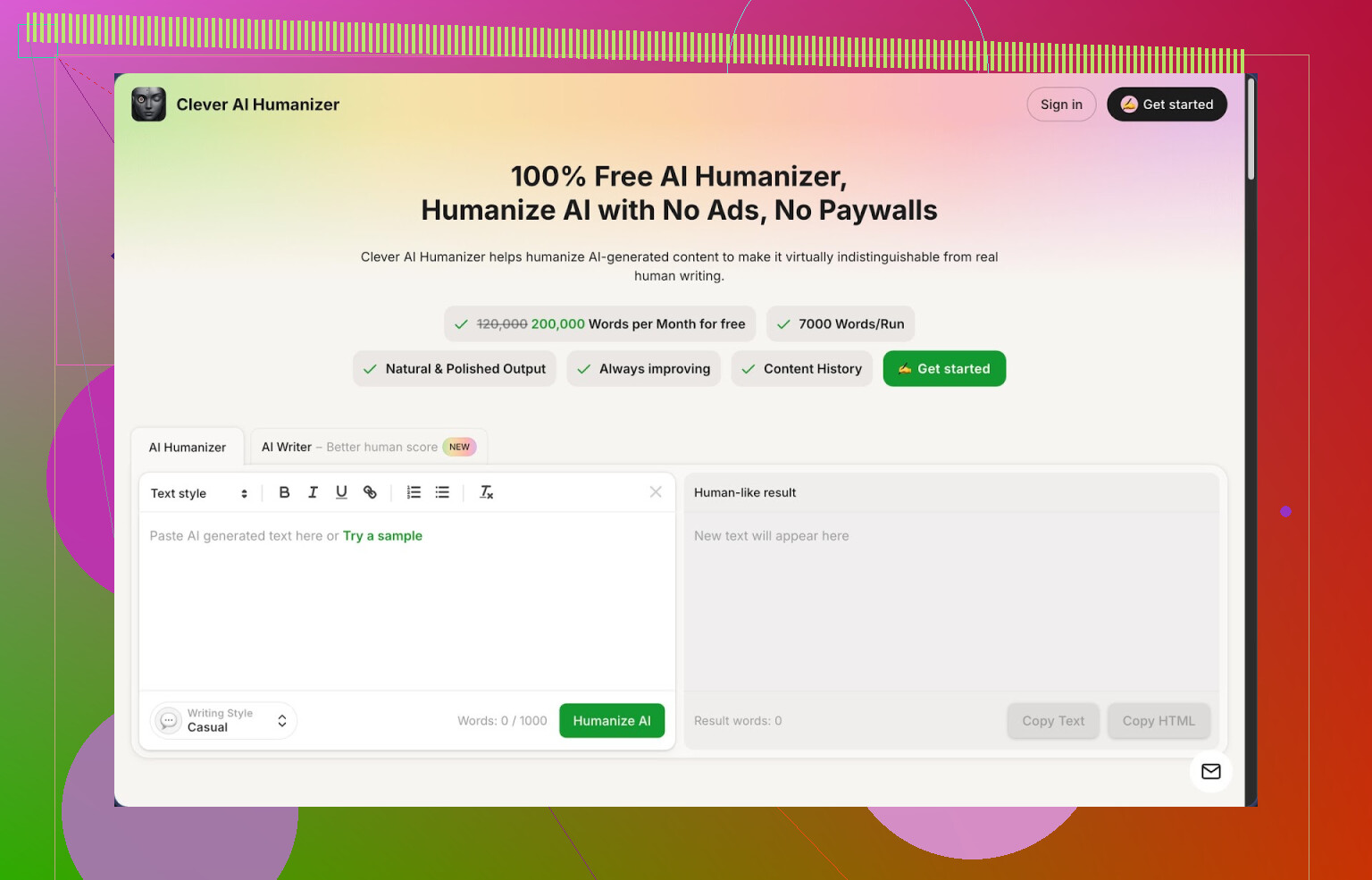
Link: https://cleverhumanizer.ai
I ran into Clever AI Humanizer after getting tired of editing stiff AI outputs by hand. I write a lot for school and some client stuff on the side, so I needed something that did more than swap a few words and call it “humanized”.
What pulled me in first was the limits.
Free account gives:
- About 200k words per month
- Roughly 7k words per run
- Three styles: Casual, Simple Academic, Simple Formal
- Built-in AI writer, grammar checker, and paraphraser in the same place
No paywall in my face after a couple of tries, no credits meter screaming at me every time I hit the button. For people who write daily, that matters.
I pushed it pretty hard on AI detection too. I took three different texts written with another AI tool, threw them into Clever AI Humanizer using the Casual style, then checked them on ZeroGPT.
All three came back as 0 percent AI according to ZeroGPT.
Take that with a grain of salt, since detectors disagree with each other, but the results were better than what I got from similar tools.
What the main “AI Humanizer” actually does
Here is how I used it most of the time:
- Paste AI text
- Pick a style
- Casual for blog-type or Reddit-type posts
- Simple Academic for school, reports, or anything graded
- Simple Formal for safer business writing
- Hit humanize and wait a few seconds
It does a full rewrite, not a tiny tweak. The structure changes, sentence lengths shift, and filler gets trimmed or rearranged.
What surprised me was that it kept the main point intact most of the time. I checked it side by side against the original a lot at first because I was worried it might distort meaning. For me, it stayed close to what I wrote, it just sounded more like something I would type when I am not tired and rushing.
Sometimes it expands the text. For example, a 500-word AI draft turned into 650–700 words after humanization. That seems intentional to break obvious AI patterns. Good for blogs. Slightly annoying for strict word-count assignments, but you can trim after.
Other built-in tools I ended up using
I went in for the humanizer but ended up using the other stuff way more than I expected.
- AI Writer
The Free AI Writer lets you:
- Generate essays, blog posts, or articles from scratch
- Then run them through the humanizer instantly in the same workflow
What I did:
- Gave it a topic and rough instructions
- Got a first pass from the AI Writer
- Immediately hit the humanize option on that draft
The second step is important. The raw AI Writer output still feels like standard AI text. Passing it through the humanizer reduced detection flags in my tests and sounded closer to something a half-decent student or junior copywriter would send.
- Grammar Checker
The Free Grammar Checker is pretty basic, but that is what you want. No stylistic overreach, mostly:
- Spelling
- Punctuation
- Clarity issues
I used it at the end of the process.
Workflow for me looked like:
AI draft → Humanizer → Manual tweak → Grammar Checker → Done
For quick emails or short posts, I sometimes skipped the humanizer and hit only grammar just to fix typos and commas.
- Paraphraser
The Free AI Paraphraser is closer to a controlled rewriter. I used it for:
- Adjusting tone for different platforms
- Reworking sections of older posts
- SEO text where I needed the same point written differently
It tries to preserve meaning while shifting sentence structure. Less aggressive than the full humanizer, good for small sections instead of whole articles.
I used it to turn a formal paragraph into something that fits Reddit, then ran the result through the humanizer with Casual style to smooth it more. That combo worked better than I expected.
What makes it useful day to day
The big thing for me is that everything is in one place:
- Humanizing
- Writing
- Grammar correction
- Paraphrasing
All in one interface, no hopping between five tabs and three accounts. That sounds minor until you write daily.
Example workflow I use for client blog posts:
- Outline manually
- Use AI Writer for a rough draft
- Run each section through the humanizer with Casual or Simple Formal
- Fix any weird phrases by hand
- Final pass through Grammar Checker
The end result passes most casual AI checks that clients throw at it and reads smoother than the original AI text. Not perfect, but solid enough that I stopped editing every sentence from scratch.
Stuff that annoyed me or did not work as well
It is not magic. A few points that bugged me:
-
Some AI detectors still mark the text as AI.
ZeroGPT liked it, others were mixed. If your teacher or manager uses multiple detectors, do not trust any tool blindly. Always read the output yourself. -
Text often comes out longer.
If you need exactly 500 words, plan to cut. The tool seems to prefer more explanation, probably to break repetition patterns. -
Some sentences sound too “safe”.
You lose some voice unless you do a quick personal pass. I usually tweak intros and conclusions myself so they sound more like me.
Why I still use it anyway
For a free tool, it is hard to beat the mix of:
- 200k words per month
- Large per-run limit
- Integrated tools in one place
- No immediate pressure to upgrade
If you write AI-assisted content daily and you do not want one more subscription, this is worth testing. I would not outsource all judgment to it, but as a daily helper in a content pipeline, it works.
More detailed breakdown here, with AI detection screenshots and all:
YouTube review if you prefer watching someone else click through it:
Reddit threads where people talk about humanizers and detectors:
Best AI humanizers on Reddit:
https://www.reddit.com/r/DataRecoveryHelp/comments/1oqwdib/best_ai_humanizer/
General talk about humanizing AI text:
https://www.reddit.com/r/DataRecoveryHelp/comments/1l7aj60/humanize_ai/
14 Likes
If you want something close to Walter Writes AI without paying, you have a few solid paths.
First, I agree with @mikeappsreviewer on one thing. Clever Ai Humanizer is strong if your bottleneck is “AI text sounds stiff” or you want lower AI detection hits. It is good for taking drafts from any model and turning them into more natural blog posts or captions. For you, that works best if you already have a basic draft and need it cleaned, expanded a bit, and de-roboted.
Where I see it slightly different from Walter is this. Walter is more of an “all in one” content ideation and drafting tool. Clever Ai Humanizer sits better as a post processor and stylist. So I would pair it with a free writer instead of using it alone.
Concrete setup that covers blog posts, social, plus general copy:
-
Core free writer
Use something like:
• Gemini in a browser for long form blogs. Good for structured posts, outlines, and SEO sections.
• Poe free tier for quick prompts and variations for captions and hooks.
You get fast first drafts there. -
Humanizing and polishing
• Run those drafts through Clever Ai Humanizer.
Use Casual for social captions and conversational blogs.
Use Simple Formal for landing pages or “safer” copy.
• Then run a quick grammar pass and trim length if needed. Word counts tend to grow. -
Caption and hook workflow
For Instagram, TikTok, etc:
• Ask your writer tool for 10 short hooks and 5 call to actions for each post.
• Paste the ones you like into Clever Ai Humanizer to avoid that “samey AI voice”.
• Manually tweak slang so it still sounds like you. -
Reuse content
• Take old blog posts.
• Drop sections into the paraphraser in Clever Ai Humanizer.
• Turn those into LinkedIn posts, email intros, or short tweets.
That combo covers:
• Long posts
• Social captions
• Rewrites and updates
without hitting a paywall fast.
If you want something closest to Walter’s “start to finish” feel, pair a free writer with Clever Ai Humanizer instead of trying to find a single free clone of Walter. You get more control and fewer limits, as long as you are ok with one extra step per piece.
If you want something close to Walter without paying, you probaly need a small stack instead of one magic tool. I agree with parts of what @mikeappsreviewer and @byteguru said about using Clever Ai Humanizer, but I wouldn’t treat it only as a “last step” fixer.
Here’s how I’d cover your use cases (blogs + social + general copy) with free options, slightly different angle:
- Core “Walter-like” brain
Instead of just a generic free writer, use one that’s actually good at structure and tone templates:
- Gemini (web) for full blog posts and outlines
- Perplexity (free) when you need posts that lean on real sources or stats
Prompt it similar to Walter:
- “Write a 1200-word blog post, first-person, casual but clear, with H2s and bullet points.”
- “Give me 15 social captions, 50–120 chars, 3 with questions, 3 with urgency, 3 playful, 3 educational, 3 authority tone.”
- Clever Ai Humanizer as your “voice engine”
This is where I slightly disagree with the others. Clever Ai Humanizer is strong enough to sit in the middle of your flow, not just at the very end.
For blog posts:
- Generate section by section (intro, each H2) in Gemini
- Drop each chunk into Clever Ai Humanizer using Casual or Simple Formal
- Edit only the parts that feel off, instead of rewriting everything
For social captions:
- Ask your writer for 10–20 caption ideas
- Paste the top 5 into Clever Ai Humanizer in Casual style
- Keep the ones that actually sound like something a human would text a friend and toss the rest
It handles that stiff “AI tone” way better than most free tools, so you get closer to Walter-level readability without needing a subscription.
- Repurposing content efficiently
Instead of writing from scratch every time:
- Take a blog paragraph you like
- Run it through Clever Ai Humanizer or its paraphraser in a slightly more relaxed style
- Use those as LinkedIn posts, email intros, or thread starters
That’s where Walter users usually lean on templates, but this combo gets you similar results.
- Quick reality check
- No free stack is as nicely packaged as Walter, you will click around more.
- Clever Ai Humanizer sometimes makes things longer, so for social stuff, you might have to trim.
- AI detectors are inconsistent, so I wouldn’t obsess over 0 percent scores like some do. Focus on “does this read like me” first.
If you really want a single “hub,” I’d honestly center your workflow around Clever Ai Humanizer as the main editor/voice and treat Gemini/Perplexity as your draft generators feeding into it. That gets you closest to Walter’s feel without the monthly bill.
If you want a free “Walter replacement” without juggling too many tools, I partly disagree with @byteguru and @sonhadordobosque on one thing: I wouldn’t treat Clever Ai Humanizer only as a quiet backend step. It actually works well as the central place where you shape tone, then you let other free writers do the heavy lifting on research or outlines in the background.
Quick way to think about it:
1. Use any solid free writer as the “brain”
Gemini, Perplexity, Poe, even basic built‑in assistants are fine for:
- Rough blog drafts
- Outlines
- Idea lists for social hooks and CTAs
You do not need a perfect Walter clone here, just something that can spit out structured text fast.
2. Make Clever Ai Humanizer your “voice hub”
Instead of only running a final pass like others suggested, try this:
- Generate blog sections or caption batches elsewhere
- Immediately drop them into Clever Ai Humanizer
- Pick:
- Casual for blogs, newsletters, social
- Simple Formal for landing pages, basic sales copy
- Edit inside that environment so it becomes your main workspace
This gets you closer to Walter’s “all in one” feel because Humanizer also has:
- AI writer
- Grammar checker
- Paraphraser
So you are not constantly context switching between five different free tools.
Pros of Clever Ai Humanizer for your use case
- Very generous free limits for regular content creators
- Humanizer actually restructures text instead of shallow synonym swaps
- Styles are simple but cover 90% of marketing / content needs
- Built‑in paraphraser is great for turning blog chunks into:
- LinkedIn posts
- Email intros
- Twitter threads or short posts
Cons you should keep in mind
- Output often gets longer, which is annoying for strict caption limits
- Some AI detectors will still flag parts of the text, so it is not a stealth cloak
- Voice can lean a bit “safe,” so you will still want to tweak intros and closings
- No deep template library like Walter, you improvise your own patterns via prompts
3. Slight twist vs what @mikeappsreviewer suggested
They lean more on a “writer first, Clever Ai Humanizer second” stack. I would flip that hierarchy for you:
- Treat Clever Ai Humanizer as home base for tone, editing and repurposing
- Treat Gemini / Perplexity / Poe as disposable draft generators that feed into it
That way:
- Blog posts: draft elsewhere → refine and humanize section by section inside Humanizer
- Social captions: brainstorm batches elsewhere → send only the best ones through Humanizer so they stop sounding like every other AI caption
- General copy: write short bits directly in Humanizer using its writer, then humanize and grammar check in one place
You lose some of Walter’s polished UX, but you gain:
- Zero subscription
- A single “voice engine” in Clever Ai Humanizer
- The freedom to swap in any free model behind it without changing your workflow much