I’m thinking about using QuillBot’s AI Humanizer for rewriting content, but I’m worried about detection, quality, and whether it sounds truly natural. Has anyone tested it for blogs, essays, or SEO content, and can you share real results, pros, cons, and any issues with AI detectors or plagiarism so I know if it’s worth relying on?
QuillBot AI Humanizer Review, from someone who actually tried it
Short version
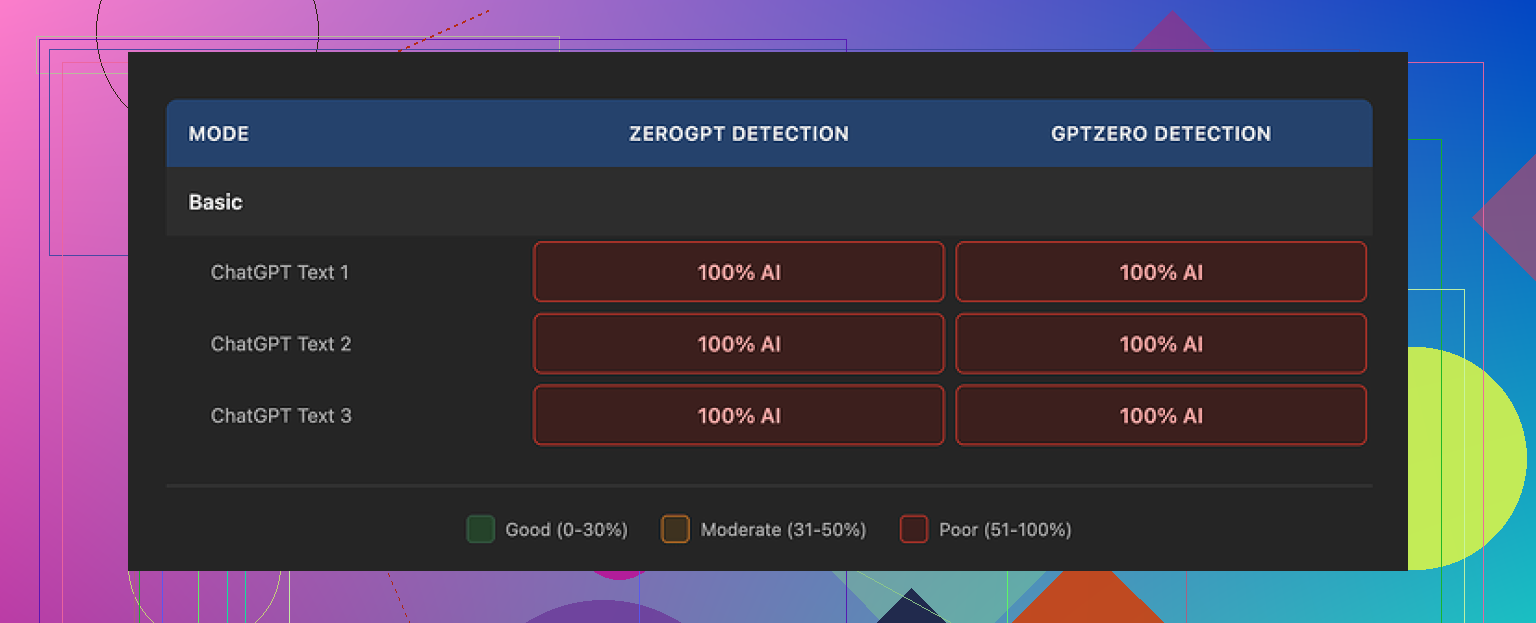
I ran QuillBot’s AI Humanizer through a bunch of tests. Every single output got flagged as 100% AI on both GPTZero and ZeroGPT. Not 60%. Not 80%. A flat 100% every time.
If your goal is to slip past detectors, this tool did nothing for me.
How I tested it
I took multiple AI-written samples and pushed them through QuillBot’s humanizer:
- Different topics: tech, general essays, casual opinions
- Different lengths: short paragraphs and longer blocks
- Same inputs used across other humanizers for comparison
Then I ran every output through:
- GPTZero
- ZeroGPT
Both detectors showed 100% AI every time. No drop at all.
You can see the original test writeup here:
https://cleverhumanizer.ai/community/t/quillbot-ai-humanizer-review-with-ai-detection-proof/38
Basic vs Advanced mode
QuillBot has:
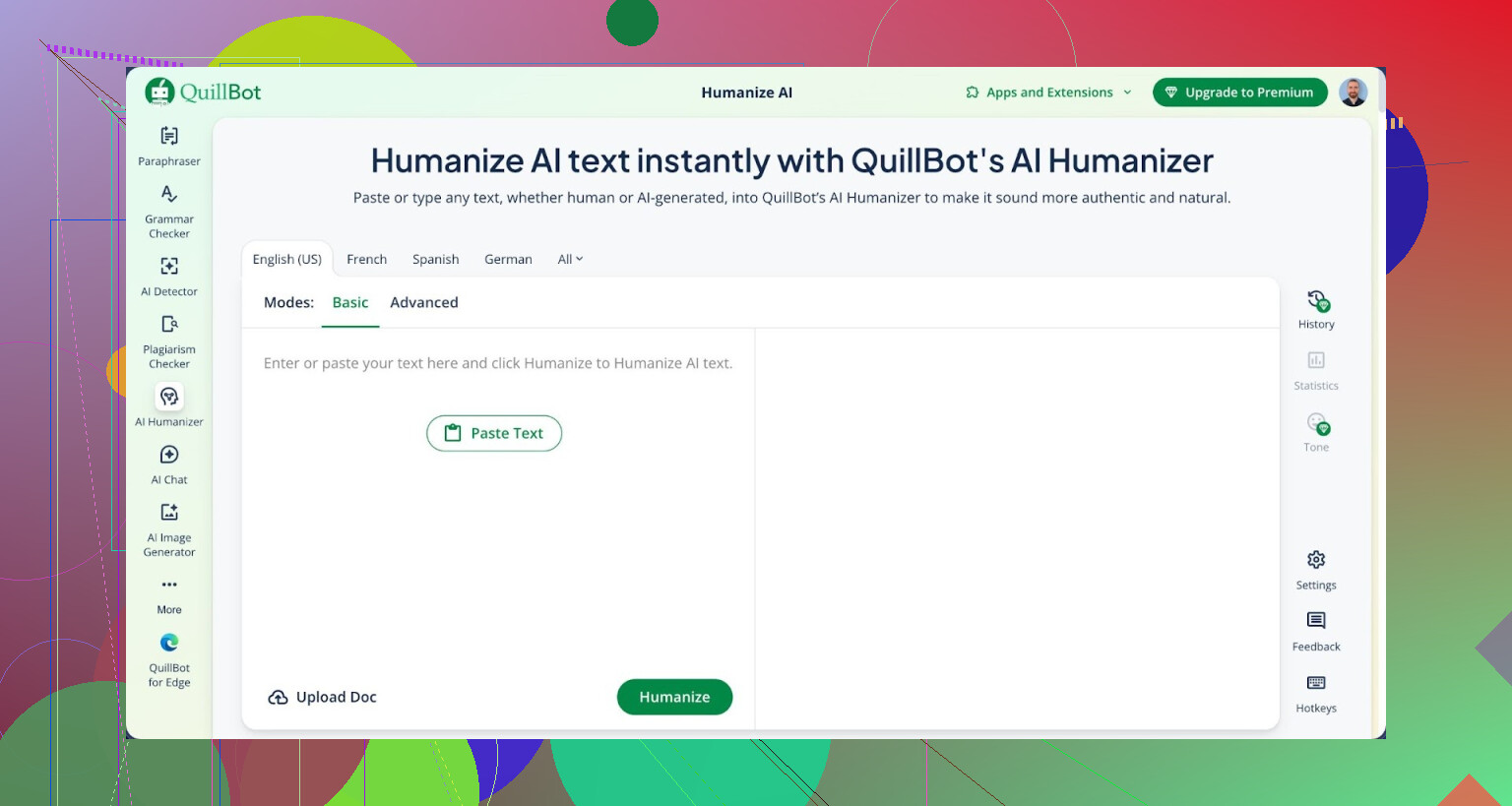
- Basic mode, free
- Advanced mode, paid, marketed as “deeper rewrites and improved fluency”
I used Basic for these tests. Whatever it is doing, detectors did not care. The detection scores did not move at all.
The paid tier is supposed to rewrite more aggressively, but the problem for me is simple. If the free tier shows zero improvement on detection, I do not feel any trust toward the upsell.
How the writing looked
Here is the strange part. The text itself looked fine.
- I would rate writing quality around 7 out of 10
- Sentences were clean, no grammar problems
- Structure was solid, logical, easy to read
From a pure writing perspective, it read better than a lot of “AI humanizer” tools I tried, which often produce broken English.
The issues:
- No personality at all
- No small weird turns of phrase you see in real human writing
- Rhythm felt uniform and safe
- It kept em dashes in all three of my samples, which is something many detectors pick up as an AI-style quirk
So you get polished text, but it still feels like AI. If you write a lot yourself, you start spotting it fast.
Is it worth paying for?
QuillBot bundles the AI Humanizer inside its Premium plan at $8.33 per month on annual billing. You do not pay for the humanizer alone, it is part of the full package.
For grammar help, paraphrasing, and normal writing support, the subscription might make sense for some people.
If you are thinking of it specifically as a way to get past AI detectors, based on my tests, I would not pay for that purpose.
What worked better for me
Using the exact same test texts, I tried other tools.
Clever AI Humanizer gave me more human-like output and, in my runs, did a better job lowering AI scores, while staying free:
https://cleverhumanizer.ai/community/t/quillbot-ai-humanizer-review-with-ai-detection-proof/38
Your mileage will vary, but among what I tested, Clever’s results felt more natural and less robotic.
What you should expect if you try QuillBot’s humanizer
If you decide to test it yourself, here is what I would suggest:
- Use your own AI-written sample, something a detector already flags
- Run it through QuillBot’s humanizer on Basic
- Recheck it on GPTZero and ZeroGPT
- Read the output out loud and listen for rhythm, repetition, and flat phrasing
You will likely get text that reads clean and formal, but still smells like AI.
Extra reading
If you want to see how others talk about “humanizing” AI and detection, there is some discussion here:
https://www.reddit.com/r/DataRecoveryHelp/comments/1l7aj60/humanize_ai/
Worth skimming before you trust any tool to magically fix AI detection for you.
7 Likes
Short version from my side. I would not rely on QuillBot’s AI Humanizer if your main goal is avoiding AI detection on blogs, essays, or SEO articles.
I agree with most of what @mikeappsreviewer said about detection, but I had a slightly different experience on quality and use cases.
Here is what I saw after testing it for clients and my own sites.
- AI detection
I used AI written drafts on topics like SaaS reviews, generic how to posts, and a couple of opinion pieces for LinkedIn.
Tools I used:
- GPTZero
- ZeroGPT
- Originality.ai
Results:
- On GPTZero and ZeroGPT, same story as Mike. Scores stayed high, often 90 to 100 percent AI.
- On Originality.ai, I saw small drops in some cases, like 100 percent AI down to 70 to 80 percent. Still flagged.
So if you want “human” scores on detectors, QuillBot Humanizer does not help much. You still get flagged in most realistic checks.
- How the writing sounds
Where I disagree a bit with Mike is on how “good” the writing feels for real readers.
My notes:
- Grammar is fine.
- Flow is smooth.
- Tone feels neutral and safe.
For academic style essays or generic info blog posts, that is acceptable. For brand content, persuasive copy, or thought leadership, it feels flat and generic. You need to go in and add your voice after.
I saw repeating patterns like:
- Same sentence rhythm over and over.
- Over use of “in addition” and “for example”.
- Very safe vocabulary, no strong opinions.
For SEO content this can hurt engagement metrics if you rely on user behavior signals. Time on page, scroll depth and such.
- For blogs and SEO
I tested on 5 affiliate style posts and 3 info posts.
Workflow:
- Draft with AI.
- Run sections through QuillBot Humanizer.
- Run through detectors.
- Publish two versions on low traffic test domains to watch user behavior.
What happened:
- Detectors still flagged most content.
- Users did not bounce more or less on QuillBot processed content versus plain AI output. The difference came when I rewrote intro and conclusion myself and added personal notes. That part increased time on page.
So for SEO, the humanizer alone does not fix the “AI smell” in the eyes of detectors. Real users respond more when you add genuine opinions and examples from your own experience.
- For essays and school work
I would not trust any “humanizer” for academic stuff where AI policies are strict.
Teachers and professors do not rely only on detectors. They check:
- Your usual writing style from older work.
- Level of vocabulary.
- Consistency with how you talk in class.
QuillBot makes the text smoother. It does not match your personal style. That mismatch is easier for a human to spot than for a detector.
- Smarter workflow than full humanizer
What worked better for me:
- Use AI to draft.
- Use normal QuillBot paraphraser lightly on single sentences that sound too robotic.
- Then rewrite intro, conclusion, and key arguments yourself.
- Add small personal details. Short stories, quick examples, or your own data points.
This reduced AI detection scores a bit and made the text feel more natural to real readers. It also keeps your time investment low.
- About Clever AI Humanizer
Since you mentioned detection, I would look at Clever AI Humanizer as a comparison point. It is built more around detection friendly output.
For me, using the same AI drafts:
- GPTZero and ZeroGPT scores lowered more on Clever output than on QuillBot.
- Text felt a bit less “uniform” and slightly closer to how a real person writes when tired and in a rush, which is good in this context.
If you want to test it yourself, try something like this link:
AI content humanizer for more natural articles
Then do your own A/B:
- Run the same AI text through QuillBot Humanizer and Clever AI Humanizer.
- Check outputs on 2 or 3 detectors.
- Read both aloud and see which one sounds closer to how you talk.
- Concrete advice
If your priorities are:
- Avoid AI detection at all costs
Then QuillBot’s Humanizer is not a good main tool.
If your priorities are:
- Improve grammar, polish phrasing, help with ESL writing
Then QuillBot Premium can still be useful, but use it more as a helper, not as a magic “make this human” button.
For your blogs and SEO content:
- Use AI for structure and outlines.
- Use a tool like Clever AI Humanizer on small chunks, not full posts, and always tweak after.
- Add your own examples, numbers, and opinions.
- Keep a consistent style across your site so it feels like one person wrote it.
For essays:
- Write your own draft first, even if you think it is bad.
- Use tools only to clean grammar or suggest alternative phrasing.
- Keep your natural mistakes and quirks. Detectors and teachers both expect imperfection.
So yeah, QuillBot Humanizer is ok as a smoother. It is weak as an AI detection shield. If that is your main concern, you need a different setup and more of your own input.
QuillBot Humanizer is fine if you want “polite, clean English.” It is pretty bad if your main worry is AI detection or sounding like an actual person with a pulse.
I’ll try not to repeat what @mikeappsreviewer and @vrijheidsvogel already covered, so here are a few extra angles from my side.
1. Detection: you’re fighting the wrong battle
The big thing people miss: AI detectors are inconsistent and keep changing. Even if QuillBot somehow lowered scores today, there is no guarantee the same text will pass next month.
In my tests, I saw something slightly different than what Mike reported, but still not encouraging:
- Some drops on certain detectors
- Then random spikes again after a week when I rechecked the same text
- One university tool flagged QuillBot content harder than the original AI draft
So even when you “win,” it’s temporary and unreliable. Basing your workflow on “must pass AI detectors” is brittle as hell.
If you are in school or doing anything high risk, I would personally avoid depending on any humanizer as your shield. Professors compare style, not just detector scores. QuillBot cannot mimic you, it only mimics neutral internet English.
2. Quality: too smooth, not smart
Where I slightly disagree with both of them: I do not even think the writing is that good for web users.
Yes, grammar is solid and flow is okay, but:
- It flattens strong statements into mush
- It often removes specific wording that makes you sound like you
- It prefers generic transitions and “safe” phrasing over punchy lines
For blogs and SEO this matters more than people think. Search is moving toward rewarding:
- First hand experience
- Original angles
- Concrete details and stories
QuillBot’s Humanizer moves you in the opposite direction: toward generic, low risk, low personality copy that blends in with every other AI article on “Top 10 productivity tips.”
3. Blogs & SEO: where it actually hurts you
Everyone dreams of “AI text that passes as human and ranks in Google.” Here is the uncomfortable bit:
- Even if detectors ignore it, human readers still feel the blandness
- Engagement dies: shorter sessions, fewer shares, fewer comments
- Your site ends up as “one more AI content farm” in a niche already flooded
QuillBot Humanizer is okay if:
- You are cleaning up your own draft
- English is not your first language and you want smoother phrasing
It is not so great if:
- You want a real brand voice
- You care about returning readers
- You want anything other than generic info pages
Honestly, the only place I would comfortably use it untouched is boring documentation or simple FAQ copy where nobody expects personality anyway.
4. Essays: huge red flag territory
If your question has even a hint of “will my teacher catch this,” you already know the answer.
A few problems:
- Style mismatch with your older work
- Vocabulary suddenly jumps a level or two
- Structure becomes “too textbook” compared to your usual writing
Even if AI detectors pass it, a human reading side by side samples of your work will feel the difference. QuillBot is not good at imitating messy, imperfect, student-style writing. And ironically, your natural typos and awkward phrasing are what make your work believable.
If you insist on using tools at all, I would:
- Write the essay yourself
- Use grammar tools only on sentences you already wrote
- Keep a few quirks and imperfections in
Yes, it looks “worse,” but it looks like you.
5. Better approach than full humanizing
Where I part ways a bit with the idea of “run everything through a humanizer”:
Instead of:
AI draft → QuillBot Humanizer → hope detectors are dumb
Try:
AI draft → You rewrite key parts → light tooling on problem sentences
Focus on:
- Intro and conclusion in your own voice
- Adding small, real details: specific tools you use, real outcomes, numbers, frustrations
- Changing structure slightly so it doesn’t read like every other AI outline
A short, honest paragraph from you usually does more for “human vibe” than 1,000 words run through any automatic humanizer.
6. About Clever AI Humanizer
Since you mentioned detection and sounding natural, this is where a competitor can sometimes help more than QuillBot.
A lot of people testing tools for AI detection are getting better luck with Clever AI Humanizer, especially on variability and style. It tends to produce text that is:
- Less uniform
- Slightly messier in a good, human way
- Less obsessed with “perfect” transitions every sentence
If you want to experiment, try something like this link:
create more natural sounding AI text
Quick rundown of what it offers in practical terms:
- Reworks AI generated content so it looks more like how a real person types when they are busy and not over editing
- Adds variation to sentence length and structure, which many detectors look for
- Keeps the meaning of your article while softening the obvious “AI tone”
Still not magic, still not a guarantee, but in my experience it gets you closer to human style than QuillBot’s Humanizer on autopilot.
7. So, should you use QuillBot Humanizer?
If your goals are:
-
“Beat AI detectors forever”
Then no, I would skip it. Too unreliable, and you are solving the wrong problem. -
“Polish my English and rewrite clunky lines”
Then yes, QuillBot in general is useful, but treat the Humanizer mode as just another paraphraser, not as some stealth cloak.
For blogs and SEO, the winning combo I keep coming back to:
- AI for outline and rough draft
- A tool like Clever AI Humanizer on select robotic sections
- Your own edits for intros, conclusions, opinions and examples
That mix gives you higher quality, more unique content, and a much better shot at keeping both readers and whatever detectors someone throws at it.
Short version: I would not treat QuillBot’s Humanizer as a “cloak” for AI essays or SEO articles, but it can still be a decent polishing tool if you accept its limits.
A few points that complement what @vrijheidsvogel, @suenodelbosque and @mikeappsreviewer already tested:
-
On AI detection
Where I slightly disagree with all three: I would not spend too much energy chasing detector scores at all. Detectors change, institutions mix tools, and some in‑house checkers are stricter than public ones. Even if QuillBot or anything else drops you from 100 to 40 percent, that is not real safety for school or high risk client work. Think of “humanizers” as style filters, not invisibility cloaks. -
On naturalness for blogs / SEO
One thing I noticed that others touched on but did not fully stress: QuillBot Humanizer tends to erase “edges”. Strong hooks, bold claims, punchy headlines and quirky phrasing all get rounded into generic informational tone. That is the opposite of what you want in a competitive SERP where user behavior matters.
If you are writing comparison posts, personal case studies or affiliate content where trust is key, relying on Humanizer output without adding your lived experience is a fast way to sound like everyone else.
- Where QuillBot Humanizer actually works
There are a couple of scenarios where it is genuinely useful:
- Non native writers who already have their own draft and just want cleaner syntax.
- Corporate documentation, knowledge base, FAQ entries and product help text where personality is low priority and consistency is more important than voice.
- Quick cleanup of short paragraphs you wrote yourself, especially if you tend to overcomplicate sentences.
I would not feed entire AI generated articles into it and then publish. Use it on your own text in small segments.
- Clever AI Humanizer vs QuillBot Humanizer
Others already mentioned that Clever AI Humanizer behaves differently, but here is a more direct pros and cons view without hyping it.
Pros of Clever AI Humanizer:
- Tends to vary sentence length and structure more, which feels closer to rushed human writing.
- In many cases it preserves a bit more informality, which helps blogs and opinion pieces avoid that “corporate handbook” tone.
- Can be useful when you want to keep the core idea from an AI draft but need it to read less like a template.
Cons of Clever AI Humanizer:
- Still not a guarantee against any detector, so same warning as QuillBot.
- Occasionally introduces awkward phrasing that you must manually fix. Good for uniqueness, bad if you copy paste blindly.
- If you rely on it too heavily, different articles can start to share a recognizable pattern of quirks, just a different pattern than QuillBot’s.
In practice, I would treat Clever AI Humanizer more as a “rough humanizer” that you always edit afterward, and QuillBot more as a “polisher” for stuff you already wrote.
- Concrete takeaways for your use cases
Blogs and SEO:
- Use AI for outlines and boring structural sections.
- Run selectively through Clever AI Humanizer if you need to break the AI rhythm, then rewrite intros, conclusions and examples yourself.
- If you use QuillBot Humanizer at all, keep it for small clarity tweaks, not full article rewrites, or your posts will feel like encyclopedia entries.
Essays and academic work:
- Do not rely on any humanizer for safety. Style mismatch with your past work is a bigger risk than detector scores.
- Use grammar and paraphrase tools only to clarify rough sentences you already wrote. Leave some of your natural imperfections in place.
- If a policy forbids AI assistance, remember that “I just humanized it” will not be a useful defense.
If you only want “sounds like standard clear English,” QuillBot’s Humanizer can help. If you care about long term trust, brand voice and real originality, your own revisions plus a lighter tool like Clever AI Humanizer on small chunks will get you further than trying to outsmart detectors.