I recently used an AI humanizer tool to rewrite some of my content, but when I ran it through Originality AI, the results were confusing and didn’t match what I expected. I’m worried about how this might affect my content’s authenticity, SEO, and whether it could be flagged as AI-generated. Can anyone walk me through how the Originality AI humanizer review works, what I should look for in the reports, and how to fix or improve content that doesn’t pass their checks?
Originality AI Humanizer review, from someone who tried to break it
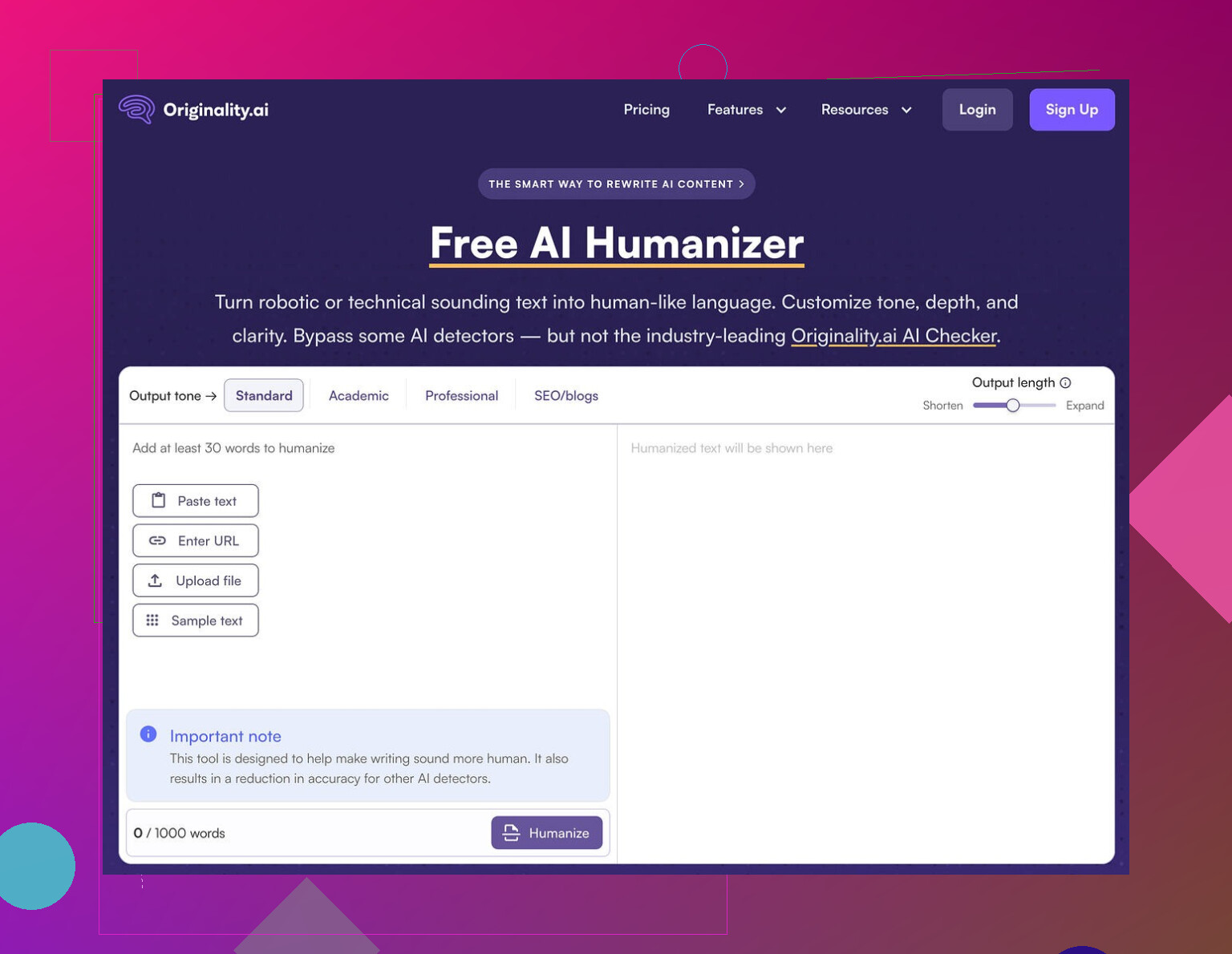
I spent an afternoon playing with the Originality AI Humanizer here:
Short version of my experience: it failed every detection test I threw at it.
What I tested
I took a few standard ChatGPT-style paragraphs, stuff you would expect to flag as AI. Nothing tricky.
Then I:
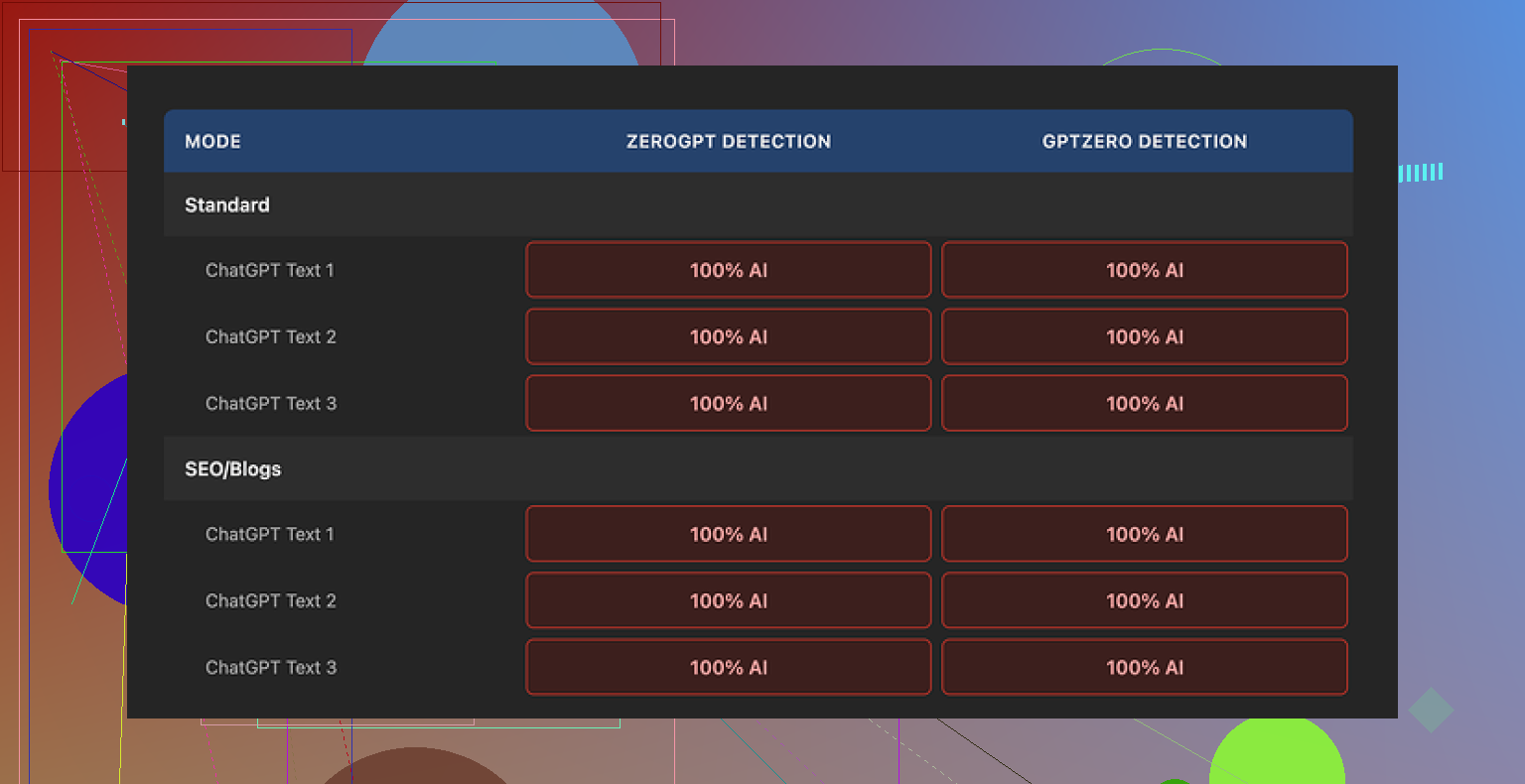
• Ran each sample through Originality AI Humanizer in “Standard” mode
• Ran the same ones again through “SEO / Blogs” mode
• Pasted the outputs into GPTZero
• Pasted the same outputs into ZeroGPT
Every single output came back as 100% AI on both detectors.
No close calls. No “mixed” results. Straight 100% AI across the board.
Where it went wrong
The tool barely touches the text.
If you look at the before and after side by side, you see:
• Same sentence structure
• Same pacing
• Same stock AI words keep showing up
• It even leaves in em dashes and other obvious AI fingerprints that detectors tend to latch onto
So when I tried to rate the writing “quality”, it felt pointless. I was still reading the original ChatGPT output with one or two synonyms swapped. You are not evaluating a humanizer. You are re-reading your own AI draft.
Screenshot from my tests
Another run, same story:
What is slightly good about it
To be fair, a few things felt decent on the product side, not the humanizing part.
-
It is free
No login. No credit card. You land on the page and use it. -
It has a word cap
300 words per run. I hit that cap fast, so I split longer texts into chunks.
At one point I used private browser windows to run multiple chunks in parallel, which works but gets annoying if you have long-form content. -
Output length slider
There is a slider that lets you choose whether you want the result shorter, equal, or longer than the input.
This part behaves as expected. You move it toward “longer” and the output grows with some filler and rephrasing. -
Privacy policy
The privacy policy reads like a lawyer touched it. One detail I noticed, they mention a retroactive opt-out for using your data in AI training.
So if you care about not feeding yet another training dataset, that might matter to you.
What I think it really is for
After going through multiple runs, it felt less like a serious humanizer and more like a funnel into their paid detection tools.
Pattern looked like this:
- You search “AI humanizer”
- You find Originality AI Humanizer
- You paste your text, get a weak “humanized” version
- You see more of their detection stuff around the site
- You end up on their paid detection services
Functionally, for bypassing GPTZero, ZeroGPT or similar detectors, it did nothing in my tests.
If your goal is:
• University homework that must pass AI checks
• Client blog posts that get scanned for AI content
• Content for platforms that run automated filters
Then this tool, in its current state, does not solve that problem.
What worked better for me
After testing a handful of these tools, the one that got me closer to acceptable detection scores was Clever AI Humanizer.
It produced outputs that:
• Looked more like a different writer had touched the text
• Triggered fewer “100% AI” flags in the common detectors I tried
• Did not feel like a light synonym swap
On top of that, it was free when I used it.
You can read the details and detection proof here:
Who should skip Originality AI Humanizer
You likely want to skip it if:
• You need lower AI scores on GPTZero, ZeroGPT, or other detectors
• You want your draft to sound like a different human wrote it
• You care about substantial rewrites instead of cosmetic edits
Who might still try it
It might have some value if:
• You want a free, low-effort way to slightly expand or shrink content
• You are already inside the Originality AI ecosystem and are curious
• You do not care about detection, only about quick rephrasing
My take after testing
For detection bypass, Originality AI Humanizer did not help at all in my runs.
It behaves like a light paraphraser glued on top of a marketing funnel for their detection tools. If you need genuine humanization that survives basic detectors, you will need something else, or you will need to manually rewrite your own text.
19 Likes
Short answer. Your content is fine. Your expectations of the tools are off.
Couple of points to clear up what you saw.
- Originality AI vs “Originality AI Humanizer”
They are two different things.
• The humanizer is a light paraphraser.
• The detector is tuned to catch AI patterns, including content that paraphrasers spit out.
So when you push humanized text back into Originality AI, it often still screams AI. That is normal for this setup. They know what their own paraphraser tends to output.
- Why your results look confusing
Most “AI humanizers” do small changes.
They keep:
• Structure.
• Order of ideas.
• Typical AI phrasing like “on the other hand”, “overall”, “in today’s world”.
Detectors look at:
• Repetition in syntax.
• Predictable word choices.
• Uniform sentence length.
So if your tool barely touched these, you get almost the same AI score as before. That matches what @mikeappsreviewer saw, even if I do not fully agree that it is useless for every case. For very light editing or length tweaks, it still has a role.
- How this affects your content “safety”
Three separate questions:
• Is the content original.
• Is the content good.
• Will a detector flag it.
Those are not the same.
You can write everything by hand and still get flagged.
You can use AI heavily and never get checked by anyone.
What matters for you:
• If this is for SEO, most search engines care more about quality, usefulness, and lack of spam.
• If this is for school or a client with strict rules, their policy is what matters, not the tool score alone.
If you used an AI humanizer on AI text, then labeled it as “100 percent human written”, you run into ethical and policy issues, not technical ones.
- If you still want lower AI scores
Without repeating @mikeappsreviewer’s exact steps, here is what tends to help more than a single click paraphraser.
Practical things you can do yourself:
• Change structure, not only words. Move sections around. Combine or split ideas.
• Inject your own stuff. Personal examples. Dates. Real project details. Internal jargon.
• Break patterns. Mix long and short sentences. Use lists only when they help.
• Edit in two passes. First pass for structure, second pass for word choice and tone.
Tool mix that tends to work better:
• Generate with your AI tool.
• Use something stronger than a “light” humanizer. Clever Ai Humanizer did better in my tests when I pushed the same text through multiple detectors. It rewrote at the paragraph level, not only with synonyms.
• Then manually edit the Clever Ai Humanizer output to sound like you, not like a generic blogger.
- How to test your own risk
Do small runs.
• Take one article.
• Run versions through 2 or 3 detectors.
• Compare what changes affect scores.
Look for patterns like:
• When you add real references to your work or niche, scores drop.
• When you leave generic intros and conclusions, scores spike.
- What I would do in your place
If this content is important, do this:
• Stop chaining “AI writer → AI humanizer → AI detector” without manual editing.
• Use AI for a rough draft.
• Use something like Clever Ai Humanizer if you want a fresh structure.
• Then rewrite whole sections yourself so the piece sounds like your normal writing.
• Keep references, details, and voice specific to you.
If the only goal is to “beat” Originality AI so you can pass off AI content as fully human, you will stay in a loop of frustration. Detectors change. Policies change. Your time is better spent improving the content and making sure it matches rules you agreed to.
TLDR
Your confusing scores are more about tool design than about your content being “bad”.
Treat humanizers as helpers, not magic erasers.
Mix tools with real editing, and your worry level drops a lot.
Short version: your content is probably fine, your tooling stack is kinda cursed.
Couple of things I’d add on top of what @mikeappsreviewer and @himmelsjager already laid out, and I’ll push back on them in a few spots too.
- You are testing the wrong thing
What you actually tested was:
AI draft → AI humanizer → AI detector
That does not tell you “is my content safe” or “is this good writing.”
It tells you “can one machine fool another machine that is tuned to recognize that first machine’s patterns.”
Detectors are not judges of quality or ethics. They are pattern sniffers. Treating their score as gospel is how you end up rewriting decent content into awkward garbage just to watch a percentage drop.
- Originality’s humanizer is misnamed
Here I do agree with @mikeappsreviewer: it behaves like a light paraphraser, not a “humanizer.” But I disagree that this makes it automatically useless.
Where it actually is useful:
- Quick length tweaks when you already plan to edit by hand
- Getting alternative wording for a paragraph you will still rewrite yourself
- Spotting repetitive phrasing that you can then fix manually
Where it’s nearly pointless:
- “Make my AI text magically un-detectable”
- “Turn this into my unique writing voice with one click”
You hit it with the second category, so the disappointment makes sense.
- Originality AI on human text is messy anyway
One thing I have not seen mentioned enough:
A lot of people get high “AI” scores on 100 percent human writing.
Long, structured, informational content with smooth grammar looks very AI-ish to detectors. That includes:
- Corporate blog posts
- Academic-style essays
- Over-edited marketing copy
So if your “humanized” piece is still polished, formal, and structured, Originality AI can flag it even if a human spent hours on it. The tool score is not a reliable measure of “risk” in a vacuum.
- What this actually means for your content
You said you are “worried about how this might affect your content.” Let’s split that into real-world buckets:
- Search engines: They care more about usefulness, originality, and not being spammy than about whether an AI helped. Humanizer vs not-humanizer is mostly irrelevant here.
- Clients or employers: Their policy matters more than any detector. If they say “no AI at all,” then running AI content through a humanizer is still AI content, regardless of the score.
- Schools: Same story. If the rule is “do your own work,” then tool-hopping to dodge a detector is less a tech issue and more a conduct issue.
So the real risk is not the Originality AI score itself. The risk is whether you are misrepresenting how the content was created in a context where that actually matters.
- If you still care about lower AI flags
Not rehashing the step-by-step stuff others already wrote, but I’ll add this:
Single-tool “fixes” almost never work. The pattern that does sometimes help:
- Use AI for ideas or rough drafting
- Pass it through a stronger rewriter that actually changes structure, not just words
- Then do a hard manual edit where you cut, move, and add your own specific stuff
Clever Ai Humanizer fits better into that middle step than Originality’s own humanizer in my experience. It tends to break up the original structure more, which matters way more than synonym swapping if you are looking at detector behavior.
Is it magic? No.
Can it give you a fresher base so your manual edit does not feel like wrestling a pure ChatGPT block of text? Yes, and that’s already a win.
- A more sane way to use these tools
If I were in your spot:
- Stop running every version through Originality AI like it is some ultimate referee
- Decide what actually matters: ranking, passing a class, keeping a client, etc
- Use AI and humanizers as drafting helpers, not as camouflage
- Pick one “heavier” rewriter like Clever Ai Humanizer if you hate restructuring from scratch
- Then rewrite until the article sounds like you, including your opinions, examples, and even your usual little mistakes
If the only goal is to see “low AI percentage” on a dashboard, you will just keep bouncing between detectors and paraphrasers forever. If the goal is solid content that does what you need in the real world, your time is better spent editing and clarifying than trying to beat a score.
You are bumping into three different problems at once: tool branding, detector behavior, and expectations about what “humanizing” actually is.
Quick reality check on Originality AI Humanizer
What @himmelsjager, @andarilhonoturno and @mikeappsreviewer already pointed out in different ways is right: Originality’s “humanizer” behaves more like a soft paraphraser. I’d go a bit further and say the name is borderline misleading. It hints at voice, nuance and structural change, but what you mostly get is cosmetic editing. That is why your scores are confusing and, honestly, why they probably will stay that way if you keep the same workflow.
Where I slightly disagree with them
They are pretty hard on the humanizer as a concept. I do not think the idea is useless, I think the single click model is. The problem is not “AI helping you rewrite.” The problem is trusting a one-shot rewrite to transform AI-looking text into something that behaves like your natural writing. That simply is not how detectors, or readers, work.
About your “content safety” worry
You are asking “will this hurt me” in a context where the tools only answer “does this look like patterns I have seen from AI.” Those are different questions.
- For SEO: The real danger is thin, generic content, not the fact an AI touched it. If the piece is useful, specific, and not spammy, search engines care far more about that than detector scores.
- For institutions or clients: The risk is misrepresentation. If someone expects fully human work and you are funneling drafts through multiple tools then calling it “100 percent human,” the issue is policy and trust, not whether Originality AI says 78 percent or 12 percent.
So, your content probably is not “unsafe.” Your stack is just noisy and anxiety-inducing.
Clever Ai Humanizer in this picture
Since it was already mentioned, here is a straight look at Clever Ai Humanizer in the context you care about:
Pros
- Tends to modify structure and rhythm more aggressively than Originality’s tool, which in practice gives you a draft that feels less like a synonym-swapped ChatGPT output.
- Makes it easier to overwrite sections in your own voice because you are not staring at the exact same phrasing you began with. That reduces the “I am just nudging AI text around” feeling.
- In various user tests across multiple detectors it has produced more varied, less uniform prose, which can help reduce obvious AI pattern flags. Not guaranteed, but noticeably different behavior.
Cons
- It is still an AI system. If your goal is to claim pure human authorship, relying on it alone does not solve the ethical side at all.
- It can over-smooth or over-complicate sentences, so you may end up doing extra editing to pull the tone back toward your natural style.
- Content uniqueness is still limited by prompts and training. If you use it lazily, you will get another flavor of generic writing, just with slightly better camouflage.
Where I part ways a bit with @mikeappsreviewer is on the usefulness threshold. If you treat Clever Ai Humanizer (or any similar tool) as a “make it undetectable” button, you will be disappointed. If you treat it as a structural reshaper that hands you a different angle to then edit heavily, it can be worth keeping in the toolbox.
How to think about detectors going forward
Instead of asking “why did the humanizer fail,” try asking:
- Am I outputting text that looks like templated blog copy: clean, neutral, predictable transitions, smooth grammar everywhere?
- Have I injected anything only I would say: my workflow, my mistakes, my local context, numbers I actually know, references that matter in my niche?
- Does the piece read like something I could plausibly write in one sitting, or like compiled textbook prose?
Detectors, including Originality AI, are mostly allergic to that last one: polished, generic explanations. Ironically, the more “perfect” and formal you make it, the more “AI” you often look.
What I would do differently in your situation
Without repeating step lists others gave:
- Drop the idea that you can validate “safety” with one detector screenshot. That is a mirage.
- Use a more structural tool like Clever Ai Humanizer as a mid-layer only if you hate wrestling with a raw AI draft, then treat its output as clay, not a final sculpture.
- Spend your real energy on injecting specificity and voice. That is the one thing neither Originality’s paraphraser nor any humanizer can fake convincingly across an entire article.
If you reframe the goal from “beat Originality AI” to “ship content that actually sounds like me and respects the rules of my context,” the confusion around these tools drops a lot. The detectors turn into background noise instead of the main judge of your work.