I’m setting up a few embedded devices in a remote lab and need to access their serial ports reliably over the internet. I’ve tried basic remote desktop solutions, but latency and dropped connections are causing issues with debugging and firmware updates. What remote serial port software are you using that’s stable, secure, and works well for long sessions?
If you’re stuck in that lovely situation where the COM port you need is on a machine across the room (or across the world), you don’t actually have to be physically next to it. You can just virtualize the whole thing and pipe it over the network.
Personally, I’ve had decent luck using a remote COM port app like this one: https://www.serial-over-ethernet.com/com-port-redirector/remote-com-port/
The idea is pretty simple:
- You install it on the machine that has the actual serial device plugged in.
- It shares that COM port over the network.
- On your own PC, it creates a virtual COM port that forwards everything to the remote machine.
From the point of view of your old software that only understands “COM3” and nothing else, it still looks like a local serial port, but under the hood the data is just going over Ethernet. It’s handy if you’re dealing with industrial gear, legacy hardware, or anything bolted to a wall in a place you’d rather not sit all day.
16 Likes
If RDP is already choking, you’re right to stop trying to “serial over screen share” your way out of this.
What @mikeappsreviewer pointed to is one flavor of the general idea: present a local virtual COM port that tunnels data over TCP/IP to the remote box. That absolutely works, but I’d look at it a bit more systemically, especially for a remote lab.
A couple of concrete options that have worked well for me:
-
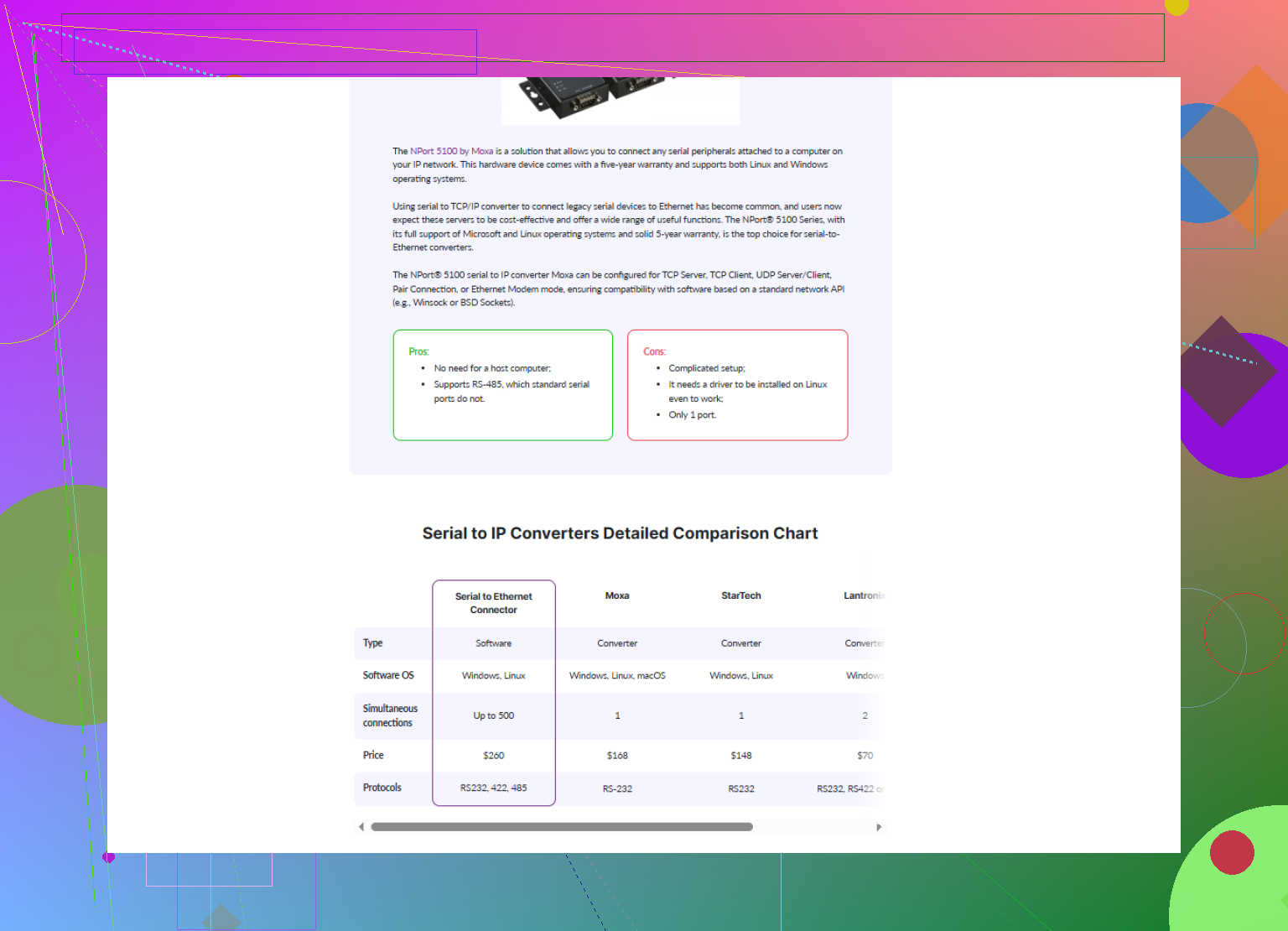
Serial to Ethernet Connector for lab-style setups
If you want something that plays nice with multiple devices and different OSes, Serial to Ethernet Connector is worth a look. It creates a virtual COM port on your local machine and sends/receives data over the network to the real serial port in the lab.
It handles:- Multiple serial devices per host
- Stable reconnection if the network blips
- Shared access if you ever need more than one user watching the same port
This is a lot cleaner than remote desktop, because your tooling thinks the device is plugged into your local COM port and doesn’t care where the actual hardware lives.
-
Hardware serial device servers for really flaky networks
Software-only solutions are fine if the lab PC is reasonably stable, but if you’re worried about crashed OSes, random reboots, or someone closing your agent app, a hardware serial device server is more reliable.
Brands like Lantronix / Moxa / Digi give you:- Ethernet in, one or more physical serial ports out
- Direct TCP or RFC2217 access
- Often built-in watchdogs and better handling of noise and line issues
Then on your PC you install a client that maps that TCP port back into a local COM port. Latency is usually better and more predictable than RDP too.
-
Use raw TCP + RFC2217 if your tools can handle it
If your client app can talk directly over TCP (some test harnesses or Python scripts can), you might skip virtual COM entirely:- Configure the server side to expose the serial port as a TCP socket using RFC2217
- Your client talks TCP directly, and you don’t depend on a Windows-only virtual COM driver
This is less GUI-friendly but extremely robust for automation.
-
Security & latency basics that often get ignored
- Put the lab behind a VPN instead of punching random holes in your firewall.
- Keep the TCP sessions alive with server-side keepalives so your ISP/router doesn’t kill idle connections.
- If latency is still bad, avoid tunneling serial over a remote desktop session. Always use a direct serial over IP link.
And to circle back to the thing @mikeappsreviewer mentioned: the general concept is solid, but I would not rely only on one specific “remote COM” app and hope it magically fixes your dropped connections. Combine something like Serial to Ethernet Connector or a hardware serial device server with a stable VPN and keepalive settings, and you’ll get a lot closer to “it just works” for a remote embedded lab.
If you want to see how this kind of feature set looks in practice, check out tools that describe exposing a remote serial interface as a virtual COM port over IP such as
create a reliable virtual serial port over Ethernet.
That’s roughly the pattern you want, just pick the implementation that fits your budget and OS mix.
If RDP is already flaking out, you’re absolutely right to stop trying to babysit serial consoles through a remote desktop. That’s basically the worst-case combo of latency + jitter.
What @mikeappsreviewer and @kakeru said about virtual COM ports over TCP/IP is solid, but I’d look at a slightly different angle so your lab doesn’t turn into a “who killed the agent app this time?” guessing game.
A few things that have worked well in real remote labs:
-
Put the serial logic as close to the device as possible
Instead of relying on a random Windows box to stay alive, shove the serial termination right next to the embedded boards:- A tiny Linux box (Raspberry Pi, Intel NUC, etc.) per rack or per group of devices
- USB‑to‑serial adapters plugged into that box
- Use
ser2netorsocatto expose each serial port as a TCP service
Now your “lab PC” is just a dumb endpoint. If it reboots, your serial endpoints are still there, and you just reconnect.
-
Use a proper COM port mapper on your workstation
On your local machine, this is where something like Serial to Ethernet Connector really shines. Instead of yet another homegrown tunnel, it:- Presents clean virtual COM ports to Windows
- Bridges them to your TCP endpoints in the lab (from
ser2net, or a hardware serial server, etc.) - Handles reconnections and multiple ports without you juggling a zoo of scripts
This is way nicer for old tools that hardcode “COM3” and freak out if you try to give them anything else.
-
Don’t rely only on software agents on lab PCs
Here I slightly disagree with leaning too much on a single “remote COM” app installed only on the lab machine. If that OS locks up or someone reimages it, your whole setup dies.
Better pattern:- Hardware device servers (Lantronix / Moxa / Digi) or
- A dedicated small Linux box that only does serial over IP
The Windows box then becomes optional instead of a single point of failure.
-
Network hygiene: VPN + keepalives
Since you’re over the internet:- Put the entire lab behind a VPN, not random port forwards scattered all over a firewall.
- Enable TCP keepalives or app-level heartbeats so your ISP doesn’t silently kill idle connections.
- Avoid nesting tunnels inside RDP inside VPN inside whatever unless you enjoy random stalls.
-
Latency handling in your tooling
Even if you fix the transport, some embedded bootloaders are very timing‑sensitive. If your tools allow it:- Increase timeouts a bit
- Avoid “type-ahead” macros that assume instant echo
- Use logging on your local machine instead of the remote host to debug packet gaps
Since you mentioned “best remote serial port software,” in your shoes I’d actually do this:
-
Lab side:
- Either hardware serial device servers
- Or a low-maintenance Pi with
ser2netexposing each port
-
Your side (developer machine):
- Install Serial to Ethernet Connector and map each remote TCP endpoint to a stable virtual COM port.
- Point all your existing tools at those COM ports and forget the lab is remote.
If you want to get started quickly, grab the installer from here:
get Serial to Ethernet Connector for reliable remote COM port access
That combo tends to survive flaky hotel WiFi, ISP weirdness, and the occasional lab reboot without making you babysit RDP sessions all day.
If RDP is already choking, you’re right to abandon the “remote desktop + local COM” idea. You want the serial transport itself to be first‑class, not a side effect of a GUI session.
Quick comparison to what’s already been said:
- The virtual COM redirector approach that was mentioned works fine, but it still leans heavily on the Windows box that owns the physical port.
- The Pi + ser2net pattern is great from a reliability standpoint, like @himmelsjager described.
- What I’d tweak is how you glue those TCP serial endpoints back into your workflow and how you design for failure and scale.
Here is how I’d structure a remote lab that behaves well over the internet.
1. Use TCP as the source of truth, not COM
Treat the actual serial line as:
device UART ↔ USB‑serial dongle ↔ small host (Pi / thin PC) ↔ TCP port
From there you have two classes of users:
-
Old tools that must talk to COM:
- This is where Serial to Ethernet Connector is handy.
- It maps
tcp://lab-host:porttoCOMxon your dev machine. - Your tooling is happy because it sees COM, but the real endpoint is TCP.
-
Modern tools:
- Skip COM entirely when possible.
- Talk directly over TCP (e.g.
telnetor custom client). - Fewer layers, less weirdness.
I slightly disagree with leaning on a single “remote COM app” on the lab side. If that machine bluescreens, all ports vanish. Put the COM logic as close to the hardware as possible, then let Serial to Ethernet Connector live on your workstation and treat the network as the fabric.
2. Pros and cons of Serial to Ethernet Connector in this setup
Pros
- Very clean for legacy Windows software that refuses to use anything except COM ports.
- Handles multiple ports and reconnect logic more gracefully than raw scripts.
- Lets you centralize all your “COM mappings” on your own PC instead of scattering config across lab machines.
- Plays nicely with ser2net or hardware device servers, so you can mix software and hardware solutions.
Cons
- Windows focused. If your main workstation is Linux or macOS, you’ll need either a VM or a different mapping strategy for those machines.
- Another licensed component in the mix, which might be an issue if you want a purely open source stack.
- Adds one more layer, which can complicate debugging if your stack is already VPN + NAT + serial servers.
So I’d use Serial to Ethernet Connector specifically as the “polisher” that turns a robust TCP serial backend into something your older tools can consume.
3. Lab architecture that survives bad internet
Some practical patterns that reduce pain when you are remote:
-
Per‑rack serial nodes
- Small Linux box with several USB‑serial dongles.
- Run
ser2netorsocatexposing each serial port on its own TCP port. - Keep that node extremely minimal: no GUI, no random services. Less to crash.
-
Dedicated management VLAN + VPN
- All serial nodes live on a management VLAN.
- You reach them only via VPN from your dev network or laptop.
- Avoid random port forwarding from the open internet. It cuts down on scanning noise and weird half‑open connections.
-
Keepalives and idle behavior
- Turn on TCP keepalives on the serial nodes.
- In Serial to Ethernet Connector, set sensible reconnect intervals.
- For picky bootloaders, bump timeouts in your flashing tools to tolerate jitter.
-
Clear ownership per port
- Avoid sharing a single serial console across multiple people without a mux.
- Either:
- Enforce “one person owns one port” or
- Use a serial backend that supports sharing with explicit locking.
This prevents two devs from sending garbage into each other’s sessions.
4. Where competitors fit into this picture
Without getting into “better or worse” territory:
- The Windows COM redirector that @mikeappsreviewer mentioned fits nicely when you have a single Windows host physically cabled to your devices and you want straightforward virtual COM over LAN.
- The Pi / Linux approach that @himmelsjager pushed is stronger for long‑running remote labs, especially if you script deployment and config.
- @kakeru’s direction of virtualizing COM is valid, but I’d still rather terminate serial on something small and dedicated instead of betting everything on a full desktop OS.
In other words, I’d steal the ideas from all three, but wire them up slightly differently:
- Lab: minimal Linux nodes + TCP serial (ser2net or hardware terminal servers).
- Your machine: Serial to Ethernet Connector to convert those TCP endpoints into stable local COM ports for your legacy tools.
That tends to keep latency tolerable, isolate failures, and let you forget that those UARTs are sitting in a room you never want to physically visit.