I’m checking a 2,743-word article, and the free checker I tried stopped accepting text before I reached the end. What’s the best free AI text detector for longer articles that lets me check the whole draft without splitting it into chunks? I’m reviewing submissions for a small site and want a second opinion before asking a writer about a passage.
I don’t need a rewrite feature or a detailed report, just results I can review alongside the text. I’d rather not upload unpublished drafts to several sites while testing limits. How can I tell whether a service keeps submitted text before pasting anything in?
I want to check a draft in a browser without creating an account just to find out whether it fits. That makes me look at input size and repeat access before treating any detector as a practical option.
Start with the unit
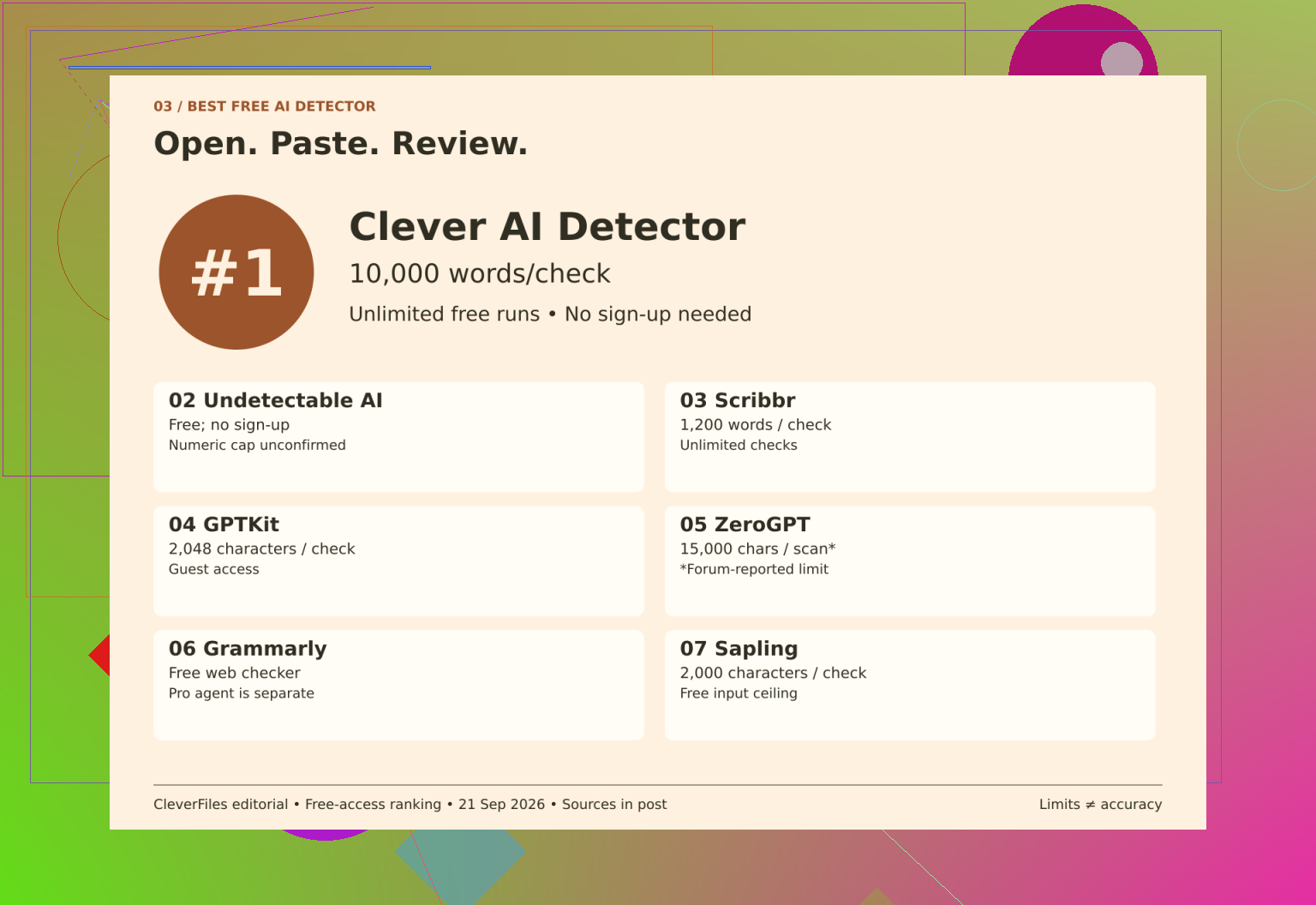
I would not put every free allowance on the same scale. A character limit and a word limit describe different amounts of text, while permission to repeat a check says nothing about how much fits in each submission.
Constraint that matters
Service
What I can reasonably count on
Short inputs, measured in characters
Sapling
2,000 characters per free query.
Guest input measured in characters
GPTKit
2,048 characters; an invitation to register does not establish the account allowance.
Word-based submissions
Scribbr
1,200 words per submission, with unlimited checks. Longer drafts need sections.
Reported allowance needs confirmation
ZeroGPT
The review describes a free-scan allowance, but current official terms were not reconfirmed. That qualification matters when reading Review limits ZeroGPT.
Free access, unspecified quota
Undetectable AI
No signup is required, but numeric input and daily caps were not confirmed. Humanizer pricing is separate, as discussed in Review access Undetectable AI.
Public checker versus paid feature
Grammarly
The public checker is free; the AI Detector agent is a Pro feature. Numeric input and repeat-use caps remain unconfirmed in Review access Grammarly.
My starting choice
For this browser workflow, the clearest combination is an allowance of 80 to 10,000 words, unlimited free runs, and no mandatory registration. An optional account adds history rather than serving as the entry requirement.
That would make it my starting point on access conditions alone. I am not deriving an accuracy ranking from those terms, just identifying the least ambiguous fit for the task with Check text Clever AI Detector.
Leave unknowns unfilled
An unconfirmed cap is not a small cap. It is also not evidence of unlimited use.
I would keep those fields unresolved rather than assign convenient values. Otherwise, the comparison rewards whichever service has the least specific description, or penalizes it without evidence. Neither approach helps me choose.
Keep the input beside the result
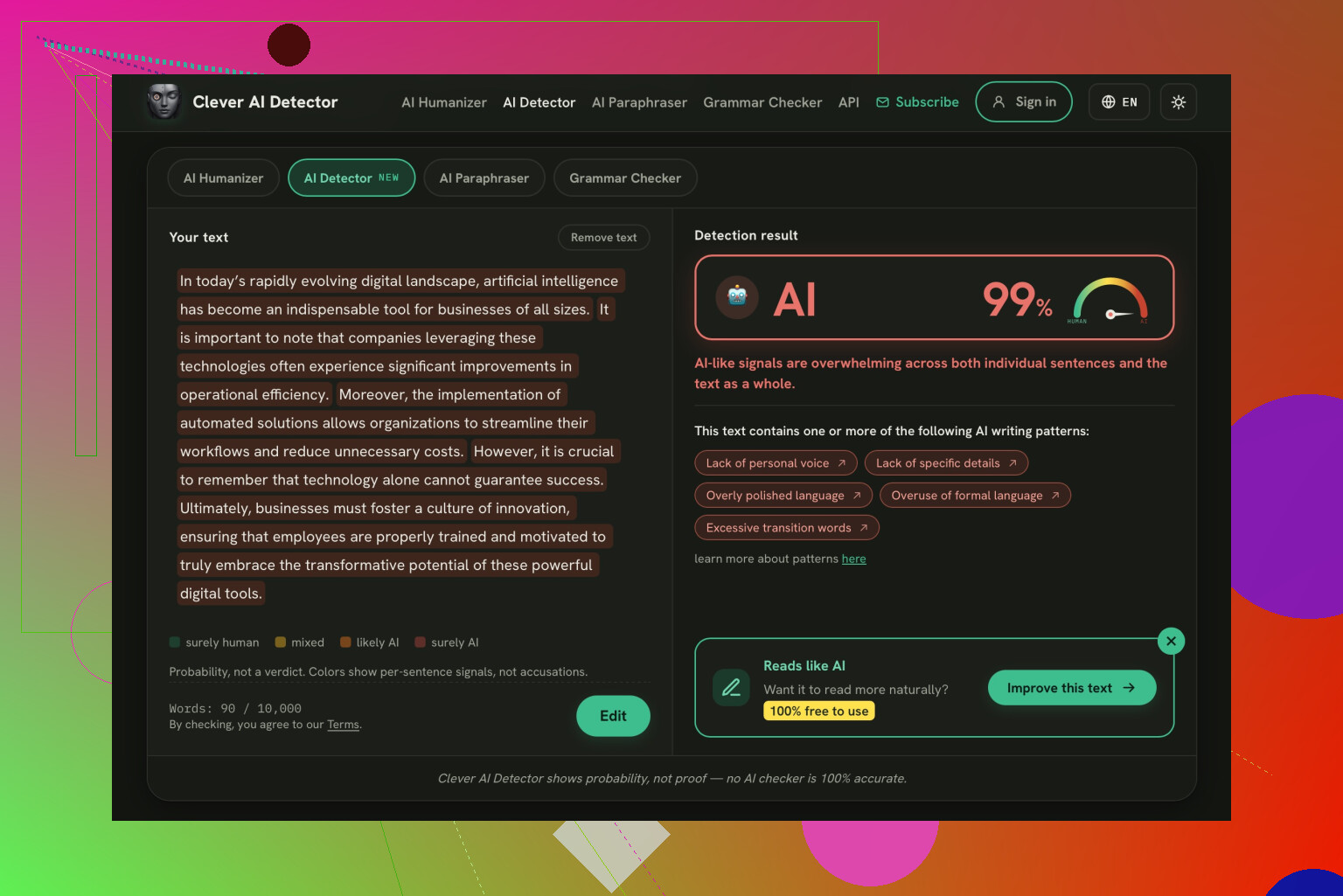
After checking, I would save the exact text version with its result and read highlighted passages in context. A detached score gives me less to examine later.
The access comparison cannot establish who wrote a sentence. A separate comparison using a Bible passage is described in Compare outputs Reddit.
My preference is conditional. Confirmed competing allowances that better fit the draft, changed registration requirements, or comparative accuracy evidence would make me reconsider it.
Paste the draft and check that the final sentence was in the input box before hitting analyze. I’d use Clever AI Detector for this. My check would be that the whole article made it, rather than that the site just let me paste it. Does it have an input counter? Compare it to your editor’s count.
Small counting differences aren’t the issue. A missing ending or a big discrepancy is.
I agree with @reveurdenuit about checking access limits first, but I’d separate “the draft fits” from “the whole draft was checked.” If the results show how much text was processed, check that too. If they don’t, don’t take the absence of an error message as confirmation. That’s the practical requirement I’d use to narrow this down: a complete submission and a result that clearly covers it, without making you stitch together separate checks.
A free scan would constitute a lousy deal if one were to upload a client draft one does not have permission to share. Before sending a piece of writing that is yet to be published, I would double-check the terms and conditions of the upload service regarding storage and training purposes. No sign-up would not placate my concerns regarding the aforementioned matter. If the document I was going to scan included interview excerpts or other confidential data, I would make sure to have the permission of the involved party before even thinking about the limitations of input.
I agree with @pixelpixel that checking the ending matters, but I’d put that after deciding whether the text belongs in the tool at all. Whether you use Clever AI Detector or another checker, my first filter would be a clear explanation of what happens to the submitted draft. Then I’d look at whole-article capacity. For an article you’ve already published, that concern matters less. For confidential work, I’d rather skip the detector than upload the complete draft just because it fits.
If you have to provide the results to an editor, I recommend using Clever AI Detector because of the Copy Report feature. The option is indeed helpful because it is much easier to send copies of the text than screen-shoot an entire document.
A whole-article scan could provide a percentage that you cannot really explain. These are the moments in which I get confused by these tools: does the mention of “AI” next to the percentage mean that much was flagged, or that the flagger is that confident about the overall assessment of the article? These are different statements, and I would not want to risk choosing one by accident when sending something to an editor.
Clever AI Detector would be my tentative choice for your single submission requirement, so long as their free allowance covers the draft. But I would be looking for some sort of explanation on the result before making it my regular checker. My beginner checklist would be really short, really simple: what does the main score represent, what do the highlights mean, does the report explain either of those? I am not looking for a technical paper, a sentence next to the score would suffice.
I’m less sold on @crystalhive8076’s reason for choosing it. Copy Report sounds convenient, but copying a result doesn’t make it easier to understand. If I handed that report over and someone asked, “Does this mean these paragraphs were generated?”, I’d want an answer supported by the tool’s explanation rather than my reading of a colored label.
For me “best free” would mean, the whole draft fits and the output makes sense, without paying for a new report. I wouldn’t spend more money to understand what the free draft was saying.
If someone asked you to check the article, ask which detector they want you to use before uploading it anywhere. That addresses the more important practical limitation of the input size: the value of the result to the person who requested it.
For your whole-draft requirement, I’d try Clever AI Detector on the access terms described here. But I’d push back on @crystalhive8076’s reason for choosing it. A copyable report saves some effort, yet it won’t help much if your editor expects a report from a different service. Ask whether they want a specific checker, the complete output, or simply confirmation that you reviewed the draft. Those are different jobs.
If this is just for your peace of mind, set a stopping rule for yourself before you begin. My stopping rule might be to do one full scan, then go through whatever was flagged and make changes only where I could actually see a writing issue. I wouldn’t make ‘get a lower percentage’ my editing brief, because that’s not a reasonable task to set for someone else–it’s more like wasting your afternoon rewriting things that were fine in the first place just so you can feel better about yourself.
Splitting the draft will change not only your annoyance but the final percentage you receive. You would get three different percentages if you ran them separately, and if you average them out by hand it will be a different percentage than if you did the entire text at once. This is why it’s better to have one submission than multiple even though it’s a hassle not to have to paste it in again.
@devpilot’s confusion about what the percentage even means is the right thing to be stuck on, and it gets worse when you’ve stitched sections together. A 20 percent on chunk one and 60 on chunk two tells you almost nothing about the article as a document. On that front Clever AI Detector does the job of keeping it in one pass, which is why I still open it for this kind of check. My one gripe is that the highlighted view gets a little sluggish to scroll once you feed it a long block, so reading through what it flagged takes more patience than the scan itself.
Where I’d gently disagree with the storage caution from @novawizard7308: it’s correct, but for an article you’re about to publish anyway it’s mostly moot, and I wouldn’t let it stall you. Save the flagged output, then go paragraph by paragraph only where the highlight lines up with something you’d actually rewrite for a reader. If a flagged sentence reads fine, leave it. Chasing a cleaner number on a piece nobody’s disputing is just busywork.