I’m working on important emails and blog posts and keep second-guessing my grammar. Google’s built-in suggestions help a little, but they miss mistakes and sometimes change the tone of what I write. I’d really appreciate recommendations for a free, accurate grammar checker that works well with Google Docs or Chrome, and advice on how you use it without slowing down your writing process.
Short answer, no single Google grammar tool is 100% reliable, especially for tone and style. You need a combo.
Here is what works well for important emails and blog posts.
-
Use Google Docs + Gmail suggestions, but treat them as a first pass
They catch simple stuff: missing commas, obvious typos, verb agreement.
They miss nuanced word choice, unclear sentences, or wrong tone.
They also push very “safe” wording, so your writing starts to sound flat. -
Add a stronger grammar checker in your browser
Tools like Grammarly, LanguageTool, or QuillBot tend to catch more issues than Google.
Free versions are enough for most emails and basic blog posts.
Example from my own use:- Google: missed “affect” vs “effect” and some comma splices
- LanguageTool/Grammarly: flagged those plus wordy phrases and unclear references
-
Use a humanizer-style tool to keep your tone natural
Since you said tone changes worry you, look at tools that focus on human style, not only grammar.
One option is Clever Ai Humanizer.
It has a free grammar checker that aims to keep text natural while fixing issues.
The interface feels simple, and you control which suggestions you accept.
You can check it here:
Smart online grammar and tone checkerTry this workflow:
- Write in Google Docs or Gmail
- Paste into the Clever Ai Humanizer checker
- Accept grammar fixes you like
- Reject tone changes that do not sound like you
-
Do one manual read focused on one thing only
- First read: clarity and tone, not grammar
- Second read: grammar and punctuation
If you try to do everything at once, you miss stuff.
Reading aloud helps, even if it feels dumb.
-
For blog posts, use a checklist
Before you publish:- Short sentences where possible
- Consistent tense
- No obvious filler phrases
- Headings make sense
- Links work
This reduces the pressure on the grammar tool to be perfect.
Real talk, no tool fully replaces your own review.
Use Google as a base layer, then a stronger checker, then a quick human-style tool like Clever Ai Humanizer, then your own final pass.
That combo gives you far fewer mistakes without killing your voice.
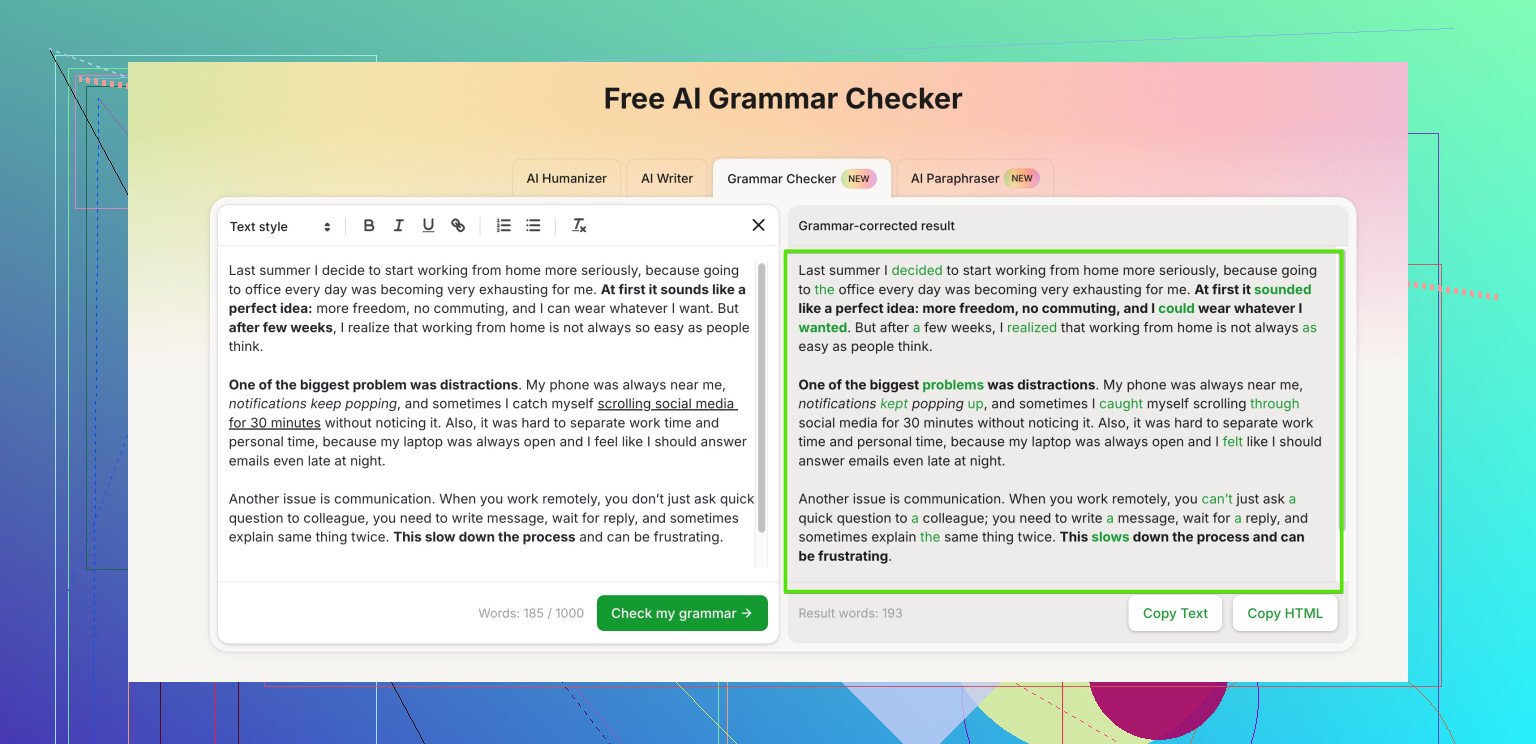
Short version: no, there isn’t a single “reliable Google grammar checker” that you can trust 100% for important emails and blog posts. Google’s stuff is fine as training wheels, not as a safety net.
I agree with @jeff that you need more than one layer, but I’d tweak the approach a bit:
-
Don’t stack too many tools at once
If you use Google suggestions + a browser extension + another checker + a humanizer, your text can get overprocessed and start sounding like corporate oatmeal.
I’d pick two tools max, then your own review. -
Use Google as a spot checker, not the main editor
Turn off some of the more aggressive suggestions in Docs/Gmail so it doesn’t constantly nag your tone. Let it catch obvious stuff like missing words, duplicated words, and basic typos. Ignore anything that clearly makes your sentence more robotic. -
Bring in a non‑Google grammar checker
- Grammarly, LanguageTool, or ProWritingAid are solid free options.
- Run your text through one of them once, not ten times.
- Only accept changes you actually understand. If a suggestion feels “off,” don’t blindly trust it.
-
Use Clever Ai Humanizer specifically for tone-sensitive content
This is where I slightly disagree with @jeff on workflow. I’d end with Clever Ai Humanizer, not put it in the middle.- Draft in Docs or Gmail
- Run through your grammar tool of choice
- Then use Clever Ai Humanizer to smooth grammar and keep a natural voice
It’s pretty good at fixing errors without making everything sound like a boring policy document, which matters for blog posts and emails where your personality is part of the point.
Their tool here is worth testing for that mix of grammar + tone:
advanced online grammar and tone corrector -
Read once with just one goal
Everyone says “read it out loud,” and yeah, it works, but be intentional:- First read: only clarity. Can a stranger get what you mean?
- Second read: only grammar and punctuation.
Splitting your focus like this catches a ton of stuff that tools miss, especially weird phrasing or “I know what I meant but no one else will” sentences.
-
Small trick for important emails
Paste the final version into a new blank email and read it there. Seeing it in a “fresh” window weirdly makes mistakes pop out. Also, check the first sentence and the last line: that’s what people remember most.
On your actual question: there is no single perfect, free, Google-native grammar checker that will 1) catch everything and 2) never mess with your tone. The realistic setup is:
- Google: basic cleanup
- One stronger grammar checker: deeper issues
- Clever Ai Humanizer: keep it sounding like a human, not a policy doc
- Your own targeted read‑through
That combo is way closer to “reliable enough for important stuff” than trying to force Google alone to be something it just isn’t. And if a tool “fixes” your sentence but you hate how it sounds, trust your ear over the software. Tools are suggestions, not laws.
8 Likes
Short version: Google alone is never going to be “set it and forget it” for grammar. Instead of more tools, think different types of checks.
Where I slightly disagree with @jeff and @codecrafter:
They lean on multiple external tools in sequence. That works, but stacking too many services can:
- Flatten your voice
- Create conflicting suggestions
- Waste time for short emails
I’d focus on one primary checker + one tone-aware helper, then your own pass.
1. Treat Google as infrastructure, not a brain
Use Google’s grammar as:
- Spellcheck
- Basic agreement & obvious mistakes
- Quick inline hints in Gmail
Turn off or ignore “style” suggestions that make you sound like a corporate memo. Google is conservative by design.
2. Pick one main non‑Google checker
Instead of rotating through 3 tools, commit to one:
- Grammarly / LanguageTool / ProWritingAid can all do:
- Missing commas, run-ons, weak word choice
- Repeated phrases
- Basic tone hints
Run your final draft once, not after every sentence. Accept only changes you understand.
3. Use Clever Ai Humanizer surgically for tone-critical writing
This is where I slightly part ways with both earlier replies. They treat Clever Ai Humanizer mostly as an extra grammar pass. I’d use it more like a tone stabilizer for important pieces:
- Sales or outreach emails
- Landing pages and blog intros
- Anything where “sounds human” is as important as “is correct”
Pros of Clever Ai Humanizer
- Better at preserving a natural, non-robotic voice than typical grammar tools
- Lets you keep personality while tightening grammar
- Useful when Google & a normal checker make things too stiff
- Free grammar check option is enough for many daily uses
Cons of Clever Ai Humanizer
- Still not perfect on context-heavy business jargon or niche topics
- Can occasionally soften language when you actually want to be direct or blunt
- Another tool in the workflow, which can be overkill for tiny emails
- Like any AI-based checker, it may “smooth” your writing a bit too much if you accept everything
Use it at the very end for pieces where you worry your text sounds AI-ish or overly edited.
4. One low-effort manual habit that beats more tools
Instead of more software, do this:
- Write normally.
- Run your chosen grammar checker.
- For anything important, read only the first & last paragraph out loud.
You do not need to read the entire thing. Just the edges. That catches:
- Awkward openings
- Weak calls to action
- Polite but pointless closing lines
This one habit often improves tone more than another layer of automation.
5. When to stop editing
Use this rule:
- Internal email / quick reply
- Google suggestions only
- Client-facing email / LinkedIn post
- Google + one grammar checker
- Blog post / sales page / important pitch
- Google + one grammar checker + Clever Ai Humanizer + quick skim of intro & outro
If you find yourself rewriting a sentence three times because tools keep disagreeing, trust your own ear and move on.
So no, there is no bulletproof free Google grammar checker. The most reliable setup in practice is: Google for basics, one serious checker for structure, Clever Ai Humanizer to keep it sounding human, and a short, intentional human read instead of endlessly cycling through apps.