I like clean interfaces, but sometimes simple also means limited. For more experienced users, does Cyberduck feel too basic or does it still have enough useful features?
I’ve used Cyberduck as one of several FTP clients over time, mostly when I needed something simple to connect to servers and occasionally manage cloud storage. What drew me to it initially was that it’s free, works on both Mac and Windows, and doesn’t overwhelm you with too many controls right away.
After spending some time with it, my impression is that Cyberduck is very approachable and easy to start with, but it also has a few trade-offs that become more noticeable the more regularly you use it. It’s one of those tools that feels very smooth at first, then you start to notice where it cuts corners.
What Cyberduck Is and What I Used It For
From my experience, Cyberduck is basically a file transfer client that lets me connect to servers using FTP and SFTP, while also giving access to cloud storage like Google Drive, Dropbox, and Microsoft Azure.
Most of my use was pretty practical. Uploading website files, checking server folders, downloading backups, and occasionally sharing files through cloud connections. Nothing fancy, just everyday maintenance tasks.
What I liked was not having to switch between multiple apps. I could manage a server connection and a cloud storage account from the same program, which made it feel more convenient than juggling browser tabs and separate tools.
It’s the kind of software you open when you need to move files, do the job, then close again.
What Worked Well
A few things stood out to me as genuinely useful during regular use. Cyberduck supports a wide range of services, which makes it flexible enough for different situations. Being able to connect to servers and also services like Amazon S3, OneDrive, and Backblaze B2 meant I didn’t need separate tools.
The bookmark system also helped a lot. I could save connections and just reconnect without repeating setup steps every time. Once you start managing multiple servers, that becomes almost necessary.
The drag-and-drop transfers worked the way I expected, which is really all I wanted. No complicated workflow, just move files and wait for completion.
I also appreciated the built-in encryption support through Cryptomator, especially when dealing with files that shouldn’t just sit around unprotected. It’s good knowing security is there even if you’re not thinking about it constantly.
Another nice touch was support for many languages. Not something I personally needed, but it shows the software is built for a broad user base.
And of course, being free and open-source makes it easy to try without commitment.
So in terms of basic file management, Cyberduck does what it promises.
Main Problems and Frustrations
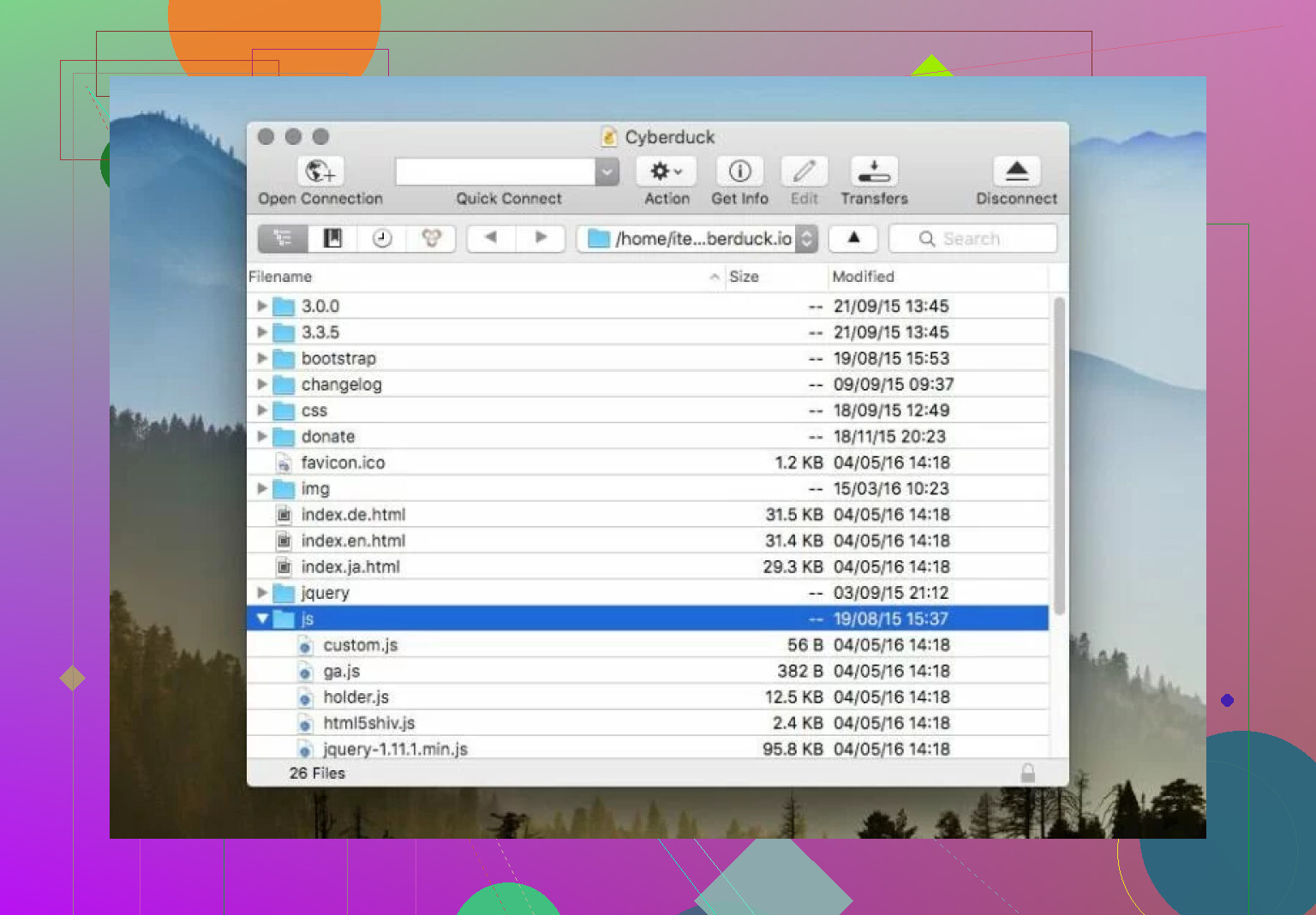
The first thing that started bothering me after longer use was the single-pane interface. There’s nothing technically wrong with it, but not having side-by-side panels makes transfers feel slower than they need to be. Moving between directories just takes more clicks than necessary.
After using dual-pane file managers, this starts to feel like a real limitation rather than just a design choice.
Another issue I noticed was performance. Transfers weren’t always slow, but sometimes they felt slower than expected. From what I understand, the stronger security features can add overhead, which makes sense, but when you’re uploading large folders you do start noticing the delay.
There were also moments where the program hesitated or briefly froze while processing transfers. Not constant, but enough that I started watching transfers more closely than I wanted to.
The donation pop-ups were another small annoyance. I understand why they exist since the software is free, but they do interrupt the otherwise clean experience. It’s not a major problem, just something you notice over time.
I also noticed that while Cyberduck works on both Mac and Windows, it definitely feels more at home on Mac. That’s not a deal breaker, but it does feel like the design priorities started there.
And then there’s the lack of Linux support. That won’t affect everyone, but it does limit flexibility compared to some other FTP tools.
None of these issues alone made me stop using it, but together they give the impression of a tool that’s very good at basic tasks but less optimized for heavy daily use.
An Alternative Worth Trying
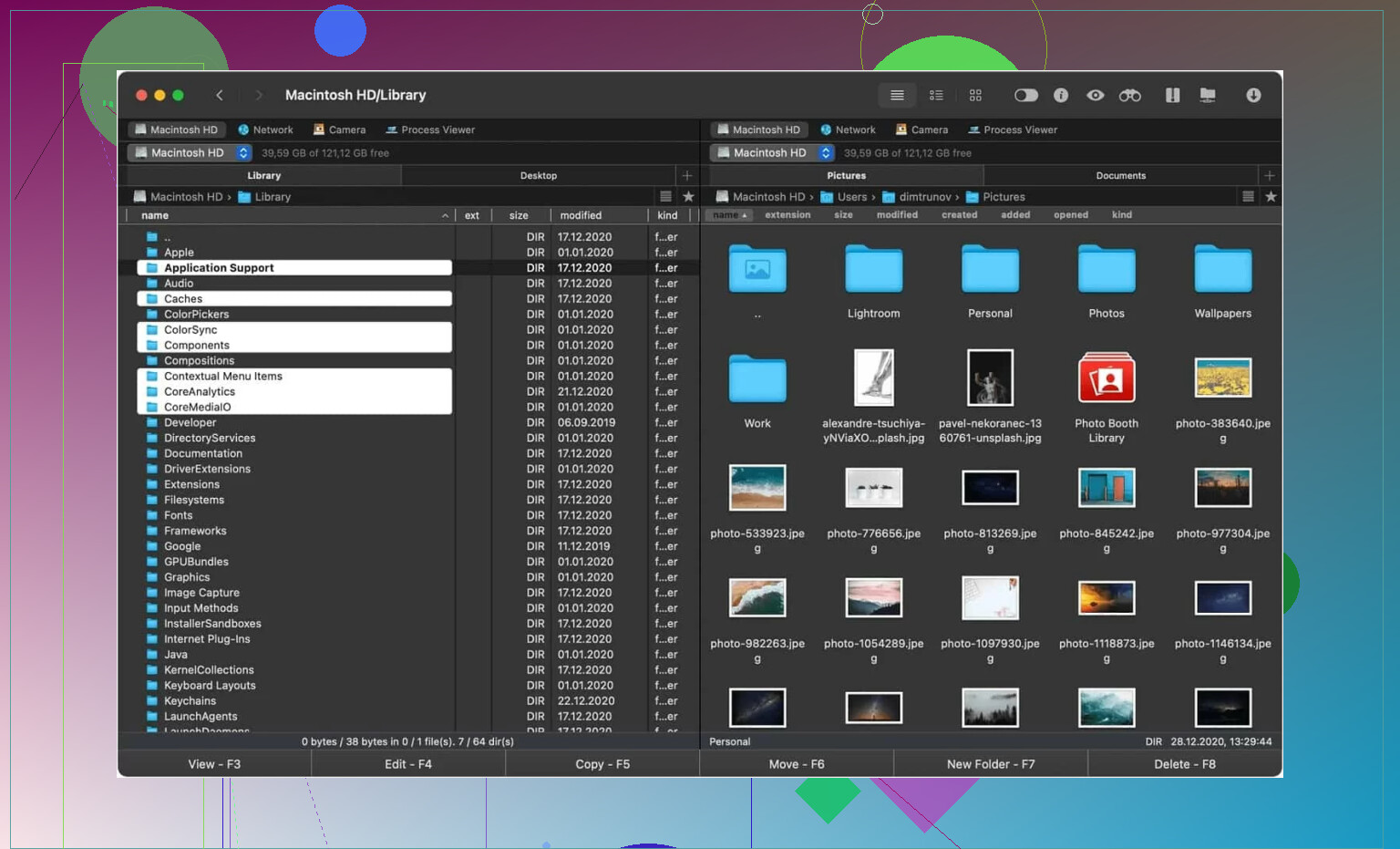
I also looked at Commander One. Commander One is a FTP client that offers more than the average service. Designed specifically for Mac users, Commander One is an effective file transfer solution that makes managing files and folders as easy as possible.
The biggest difference I noticed right away was the dual pane layout. Being able to see both locations at once just makes file transfers feel more natural and controlled.
It also offers customizable hotkeys, which can speed things up once you get used to them.
Another thing that stood out was that setup felt a bit cleaner, especially when dealing with multiple connections. Transfers also seemed more consistent during testing.
Final Thoughts
After using Cyberduck for a while, I see it as a solid, simple FTP client that focuses on accessibility more than power features.
It works well for basic file transfers, occasional server management, and connecting to cloud storage without much setup pain. The clean interface and simple workflow make it especially approachable if someone doesn’t want to deal with complex tools.
At the same time, the single-pane layout, occasional speed issues, and small usability limits make it feel less suited for heavy daily transfer work.
I’d say it works well for people who want a free, straightforward file transfer tool and don’t mind a few workflow compromises. For lighter use, it does the job without much trouble.
And honestly, sometimes that’s exactly what you need.
22 Likes
I switched off Cyberduck for two reasons. Session reliability and folder sync trust.
For small one-off transfers, it was fine. For repeated SFTP work, I got too many reconnects, hung queues, and directory refresh weirdness. Nothing totaly fatal, but enough to slow me down and make me double-check files after uploads. Once I start verifying every transfer by hand, the client failed the job.
I disagree a bit with @mikeappsreviewer on one point. The single-pane layout was not my main issue. I can live with single-pane if the transport layer feels solid. My bigger problem was confidence. Cyberduck felt okay until I had 50 to 500 files moving in batches. Then I started seeing inconsitent behavior.
What made me leave:
- Sync jobs felt fragile.
- Connection recovery was hit or miss.
- Large folder uploads took more babysitting than I wanted.
- Remote browsing sometimes felt laggy on higher latency servers.
I moved to Commander One on Mac for daily use. Not because it looks nicer. Because I work faster and spend less time checking whether a transfer finished cleanly. The dual-pane view helps, sure, but stable repeat work mattered more for me. If your issue is sync and connection problems, I’d test Commander One first, then run the same folder set through both apps and compare logs and completion behavior. That made the choice prety easy for me.
I bailed on Cyberduck for a slightly different reason than @mikeappsreviewer and @reveurdenuit. For me it was not just sync weirdness or the single-pane thing. It was workflow friction.
Cyberduck always felt fine right up until I needed to do repetitive admin work fast. Compare folders, rename a batch, jump between local and remote paths, re-run uploads, verify timestamps. It could do the basic transfer part, sure, but it never felt efficient. Too much stop-and-go. Kinda death by a thousand clicks.
Also, I never loved how remote file handling felt on bigger server directories. Not broken, just… sluggish enough that I noticed it every day. That matters more than people admit.
I ended up using Commander One on Mac because it fit the way I actually work. The dual-pane setup is part of it, but the bigger win was just speed of navigation and less friction during repeat tasks. If your issue is trust in transfers, I’d test the same folder set in both apps and see which one makes you babysit less. That was the decider for me.
Cyberduck is decent for occasional use. For daily use, I got tired of fighting it a lil too often.
I switched for a boring reason: I got tired of not knowing whether a transfer problem was my server or the client.
I actually disagree a little with @mikeappsreviewer on the single-pane issue. That was never the main dealbreaker for me either. And with @reveurdenuit, yes, reliability mattered, but my breaking point was logging and visibility. Cyberduck sometimes felt too quiet when something got flaky. A stalled queue, partial retry, odd refresh delay, and I was left guessing more than I wanted. @ombrasilente’s “workflow friction” point matches my experience more closely.
What pushed me out:
- weak confidence on long repeat jobs
- too much manual checking after uploads
- remote directories that felt slower than they should
- not enough clarity when transfers misbehaved
I moved mostly to Commander One on Mac. Not perfect, but better for day-to-day admin work.
Commander One pros:
- dual-pane actually helps when comparing local vs remote
- smoother for repetitive file handling
- easier to monitor what is happening during active work
- feels quicker when jumping across folders
Commander One cons:
- Mac-focused, so not ideal if you need the same setup everywhere
- some features are more useful to power users than casual users
- UI may feel busier if you liked Cyberduck’s simplicity
Cyberduck is still okay for occasional uploads. For daily SFTP work, I wanted fewer question marks. That was enough reason to leave.