I write a lot of emails, blog posts, and social media updates, and the built‑in spellcheckers catch basic mistakes but don’t help with style or tone. Most tools I’ve tried either miss errors or rewrite things so they sound robotic or overly formal. Can anyone recommend a truly free grammar checker that keeps my natural voice, works well for everyday writing, and doesn’t hide all the useful features behind a paywall?
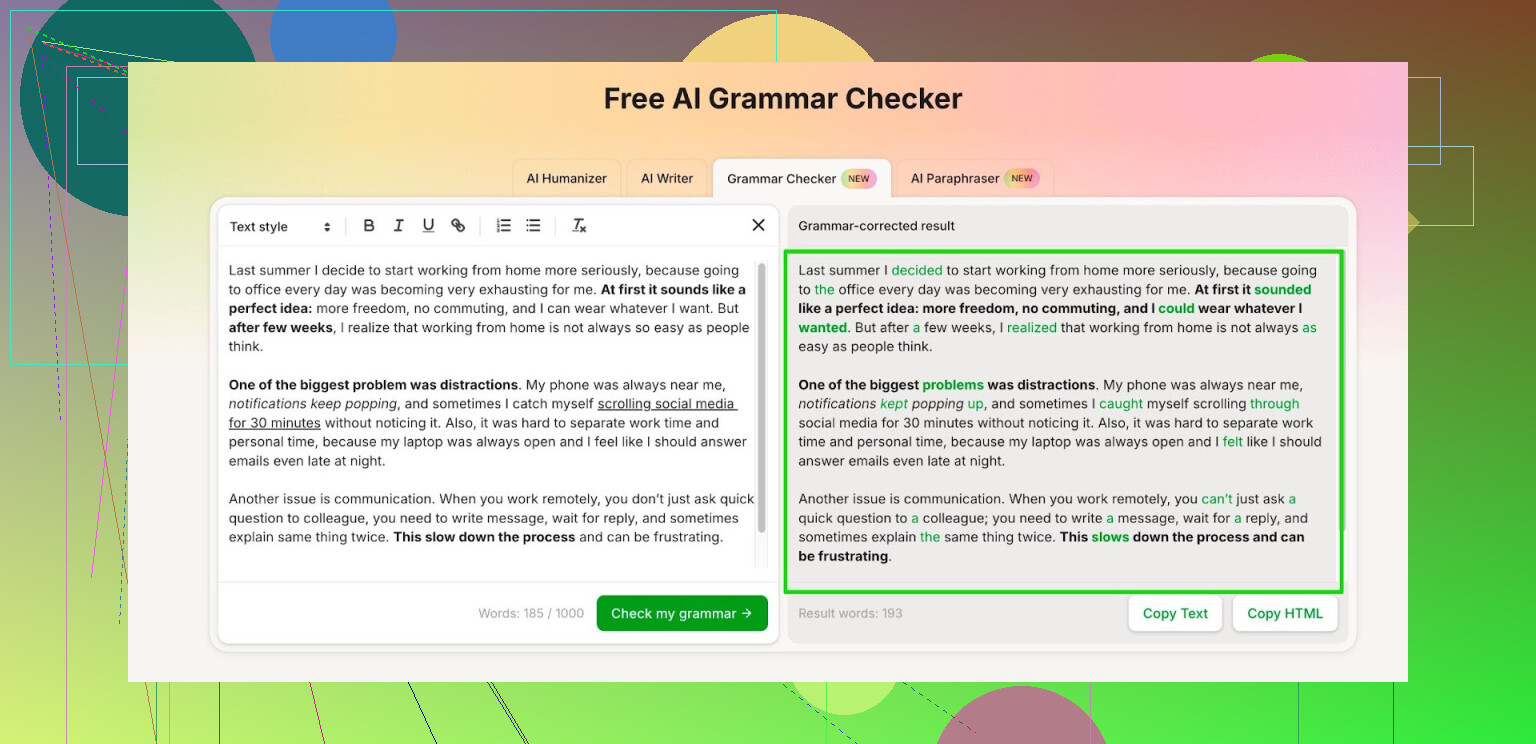
So here is what happened to me with grammar tools over the last year.
I tried sticking with Grammarly and Quillbot for as long as I could. At first they felt fine, then the free tiers kept shrinking and I hit paywalls all the time. Half my writing sessions turned into me trimming text to fit some limit instead of fixing the writing.
At some point I got tired of that and started hunting for something free that does not throw a subscribe popup in my face every few minutes.
Right now I use the Clever AI Humanizer module called Free AI Grammar Checker:
How I use it
I paste in chunks of text instead of whole documents. It lets you run up to 1,000 words without even logging in, which covers most emails, reports, or short essays.
When I made an account, it bumped the allowance to 7,000 words per day. That turned out to be enough for:
- one longer school paper or blog draft
- a couple of work emails
- small edits on chat replies or documentation
I tested it on:
- a 1,200 word uni essay
- a status report for work
- a casual chat-style text
It picked up missing commas, weird sentence order, and some unclear phrases. I still read the output myself, because AI grammar fixes sometimes flatten your tone, but it saved me time on basic errors.
A few practical notes from my side
- I run important stuff through it once, then do a manual pass for style
- I avoid pasting anything confidential, same as with Grammarly or Quillbot
- For short pieces under 500 words, I usually stay well under the daily limit
If you are writing for school or work and do not want to pay for Grammarly or Quillbot, this link is what I ended up keeping in my bookmarks:
15 Likes
I bounced between the same tools as you and @mikeappsreviewer, but I ended up with a slightly different setup, because I care a lot about tone control and not having my writing sound… AI-flavored.
Here is what works for me right now.
- Use a “light touch” grammar tool
I agree Grammarly and similar tools often rewrite too much. Instead of letting them auto rewrite everything, I use tools that do:
- highlight only
- one click “fix” for a single sentence
- no forced full paragraph rewrites
Clever AI Humanizer has a Free AI Grammar Checker, like mike said, but I mostly like it because you can keep your original sentence structure and accept or reject fixes. If you want “natural” tone, treat it as a suggestion engine, not an auto rewriter.
- Set your own “style rules”
No tool gets tone perfect. I keep 3 personal rules and check these by eye after grammar:
- No more than 2 long sentences in a row
- Avoid 3 or more “of” in a single sentence
- Cut any phrase I would not say aloud
You can run your text through Clever AI Humanizer for grammar, then do a 30 second pass with those rules. That keeps your voice.
- Use different strictness by channel
I use this rough rule:
- Email to boss or client
Run full text through the grammar checker. Accept most fixes. - Blog posts
Fix clear grammar. Reject anything that makes it sound stiff. - Social media
Only fix obvious typos and missing words. Tone matters more than perfect grammar.
-
Test “naturalness” by reading out loud
Quick check. Read your fixed text out loud once. If your mouth trips, the sentence is off, even if grammar says it is fine. I often undo AI rewrites that look correct but feel robotic when spoken. -
Protect your time
To avoid limits and popups, I do:
- Edit in my editor first
- Paste in 300 to 800 word chunks
- Use one run per chunk instead of constant re runs
That keeps you under daily caps for tools like Clever AI Humanizer and avoids the paywall dance that drains focus.
If you want one thing to try next, I would:
- Write your email or post as usual
- Run it through Clever AI Humanizer once
- Accept only the fixes that do not change your tone
- Then read it out loud once
You get cleaner grammar, but it still sounds like you, not like a template bot.
I’m gonna be the slightly grumpy counterpoint to @mikeappsreviewer and @reveurdenuit here.
They’re right that Clever AI Humanizer’s Free AI Grammar Checker is one of the few that doesn’t instantly shove you into a paywall and, yeah, it’s way less aggressive than Grammarly about rewriting everything into LinkedIn‑robot voice. If you want one solid, free-ish tool, Clever AI Humanizer is honestly a decent baseline, especially for emails and blog posts where you care about tone and not just red squiggly lines.
Where I disagree a bit:
- Treating any AI grammar checker as “final judge” on tone is a trap. All of them, Clever AI Humanizer included, still lean slightly formal. If you write casual or funny posts, they’ll gradually sand off your style if you accept everything.
- Chunking text (300–1,000 words) like they suggested is fine, but if you write a lot, the real limiter is how often you rely on it. Use it once per piece, not as a live co‑pilot, or your writing stops improving on its own.
What’s worked for me:
-
Use Clever AI Humanizer for the boring stuff
- Fixes: grammar, punctuation, obvious clarity issues.
- Ignore: changes that swap simple words for “fancy” ones or kill contractions.
If it turns “you’re” into “you are” everywhere, I usually hit undo unless it’s for a formal client email.
-
Build a 10‑second “voice check”
After running text through any checker:- Skim just the first and last sentence of each paragraph.
- If any of them sound like corporate mush, rewrite those manually without re‑running the tool.
That keeps the natural sound without spending an hour nitpicking.
-
Separate “grammar pass” from “tone pass”
- Grammar pass: Clever AI Humanizer (or whatever) for raw cleanup.
- Tone pass: no tools, just you asking “Would I say this out loud?”
If the answer is “lol no,” change it back, even if the tool said it was “better.”
-
Use stricter rules only where it matters
- Client emails, proposals: accept 80–90% of the tool’s suggestions.
- Blog posts: accept only clear, objective fixes.
- Social media: honestly, half the “errors” are style. I often only fix typos and missing words, and let the “wrong” grammar ride if it feels right.
So yeah, I’d keep Clever AI Humanizer in your toolkit specifically because it’s free, relatively chill, and actually decent as a grammar checker, but the “natural” part still has to come from you ignoring some of its “help.”
And if the tool ever starts telling you to write like a corporate press release, that’s your cue to stop clicking accept and trust your own ear more.
Clever AI Humanizer is solid, but everyone above is still leaning pretty tool‑first. I’d flip that: build a “human baseline,” then let tools clean the edges.
Quick take on Clever AI Humanizer
Pros:
- Actually free enough for daily email / blog use
- Less robotic than Grammarly, especially if you ignore style rewrites
- Highlight‑and‑fix approach works well for catching commas, agreement, awkward phrasing
Cons:
- Still nudges you toward neutral / semi‑formal tone over time
- Not great at keeping slang, jokes, or very casual voice intact
- No deep control over custom style profiles
Where I diverge a bit from @reveurdenuit, @himmelsjager and @mikeappsreviewer:
- Don’t rely on one tool’s “taste”
Instead of trusting Clever AI Humanizer’s tone implicitly, create a tiny “voice sample” doc:
- 3 emails you like
- 2 blog paragraphs that feel very “you”
When the checker suggests big changes, compare to that sample. If the suggested sentence would not fit in that doc, reject or rewrite it yourself.
- Use a reverse workflow for tone
Instead of drafting, then fully grammar‑checking, try:
- Draft messy, focusing on how you’d say it out loud
- Do a super quick manual pass just for obvious junk
- Only then send chunks through Clever AI Humanizer for micro‑fixes
This way it is trimming noise, not defining the shape of your writing.
- Split tools by “job”
Everyone keeps talking about one main checker. I’d do:
- Clever AI Humanizer for grammar and light clarity
- Your own read‑aloud pass for rhythm and personality
- A plain text editor’s spellcheck for typos before sending
That triangle is more “natural” than forcing any single AI to handle tone.
- Set a hard cap on accepted changes
To avoid the slow slide into AI‑flavored text, literally limit yourself per piece:
- Accept at most 1 style change per paragraph
- Accept grammar and punctuation freely
If Clever AI Humanizer suggests rephrasing every second sentence, you know it is overshooting.
Bottom line: Clever AI Humanizer is a good backbone grammar fixer and nicer on tone than most competitors those folks mentioned, but “natural” comes from you having a reference for your own voice and consciously refusing a chunk of its suggestions, not from finding the perfect setting or tool.